Inspiring
July 19, 2017
Answered

Markers panel > Jump to marker on timeline

  • July 19, 2017
  • 4 replies
  • 12260 views

We're working on a big project with something like 10 hours of raw interviews; we've gone through each of the interview clips and made notes/comments on the content using markers. The marker panel is a great way to quickly view the notes, sort the clips by general topic (a different marker colour for each topic).

The hitch I'm hitting is finding that particular marker on the timeline... as we dice up the clips and shuffle the order around, it becomes increasingly difficult to figure out where a particular marker is located on the timeline -- I usually end up looking for all of the markers of a particular colour and hovering overtop to match the comments of the marker I'm looking for.

Surely, there's an easy way to jump to a particular marker on the timeline? Ideally, what I'd like is to, say, right-click on an entry in the Marker panel, and have the playhead jump to that spot. Does something like that exist...?

This topic has been closed for replies.
Correct answer Meg The Dog

So I tried this out on a couple of different machines yesterday, and still have the same result (i.e. nothing...). It's got to be a workflow issue, but I'm not sure what I'm doing wrong. Here's my process in as much detail as possible:

I'm in my Timeline panel, working with basic multi-cammed interview clips -- 2 cameras, video nested -- on V1 with a separate, offboard audio track from location sound on A1. As I'm playing through the interview, I'll select the video track and add a marker (usually with a KB shortcut, but sometime with the Add Marker button on the top L of the Timeline panel). The result is a marker added to the video clip only. It shows up in the Marker panel, where I double-click on the thumbnail to change the marker colour, exit from the dialogue box, then enter a comment in the text box in the Marker panel -- something like "My name is Frankie P. Cheesewinkle, and I moved here in 1997 to join the outlaw biker gang 'All's Gouda'". I continue playing the clip and adding markers using that same process, effectively giving us a super rough, basic transcription in the Marker panel.

In editing, we sort the clips by colour to find different interview subjects. Clicking anywhere in the Marker panel doesn't move the playhead at all; I can edit the in/out times for each marker and edit the text, but nothing else happens when I click on the marker.

Are you guys running Premiere 11.1.1, or an older version?

This feels like a total n00b question, but what workflow do you guys use in order to get the markers to work properly?


I thought it might be an issue marking a nest, but just tested it on nested clips with markers and again, if I click on the marker in the marker panel, the playhead moves to the marker in the timeline.

Premiere Pro: 11.1.2

I have noticed that it will not move the playhead unless "Sequence Timecode" is toggled on in the Marker Panel drop down menu next to the Marker Panel Tab:
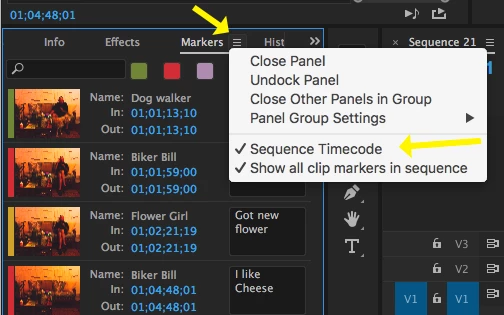
I am not 100% sure I understand the full functionality of the toggling "Sequence Timecode", from the Adobe website:

"When in sequence timecode mode, only the clip markers in the current sequence are displayed in the Markers panel. Any clip markers outside the in/out range of a clip are not shown. Sequence timecode will auto update if sequence timebase is changed."

You could try toggling that on if it is off.

MtD

4 replies

ETorr
Inspiring
July 20, 2017

Another one for Feature Request/Bug Report Form  about copy/pasting & exporting/importing Markers. (Pasting and Importing are currently not an option)

Title Copy & Paste / Import of exported markers

How would you like the feature to work?

Ability to move markers from one clip to another.

Either by means of copy and paste

Or by means of importing from an exported CSV or TXT

Why is this feature important to you?

The ability of someone to create markers in one project and pass those markers via a marker file for import.

Ability of copying markers from one bin instance of a clip to its duplicate.

Inspiring
July 20, 2017

In my limited experience, it is not helpful to have too many branches and topics within a thread. People searching for answers to specific issues, such as the subject line of this thread: Markers Panel > Jump to Markers on Timeline may find the addition of the subtopic within the thread of feature requests for Marker improvements - such as cutting and pasting markers - confusing or superfluous as they are not related to the subject line/ main issue of the thread.

I would suggest starting another thread with the topic of "suggested feature requests for markers improvements" as that will make it easier to find, and those suggestions will be easier to find, comment and act on.

MtD

ETorr
Inspiring
July 20, 2017

https://forums.adobe.com/people/Meg+The+Dog  wrote

In my limited experience, it is not helpful to have too many branches and topics within a thread. People searching for answers to specific issues, such as the subject line of this thread: Markers Panel > Jump to Markers on Timeline may find the addition of the subtopic within the thread of feature requests for Marker improvements - such as cutting and pasting markers - confusing or superfluous as they are not related to the subject line/ main issue of the thread.

I would suggest starting another thread with the topic of "suggested feature requests for markers improvements" as that will make it easier to find, and those suggestions will be easier to find, comment and act on.

MtD

Agreed...  apologies.

Compiled here: Markers Panel -- Feature requests (compilation)

ETorr
Inspiring
July 20, 2017

Another entry for Feature Request/Bug Report Form

Marker Functionality -- increased integration with PPro ecosystem.

How would you like the feature to work?

Ability use Metadata properties on markers.  Metadata applied to markers wouldn't necessarily have to embed in the file.  The benefit would be in unifying categories headers and contents so that both clips and markers within clips could be tagged in a way that lends itself to conceptual consistency.

Why is this feature important to you?

App consistency / project & workflow consistency and efficiency.

ETorr
Inspiring
July 19, 2017

Derjis  wrote

We're working on a big project with something like 10 hours of raw interviews; we've gone through each of the interview clips and made notes/comments on the content using markers. The marker panel is a great way to quickly view the notes, sort the clips by general topic (a different marker colour for each topic).

The hitch I'm hitting is finding that particular marker on the timeline... as we dice up the clips and shuffle the order around, it becomes increasingly difficult to figure out where a particular marker is located on the timeline -- I usually end up looking for all of the markers of a particular colour and hovering overtop to match the comments of the marker I'm looking for.

Surely, there's an easy way to jump to a particular marker on the timeline? Ideally, what I'd like is to, say, right-click on an entry in the Marker panel, and have the playhead jump to that spot. Does something like that exist...?

A single-click on a marker in the Markers Panel cues the playhead.

Would be great to add functionality to the Markers Panel:

- Ability to sort by Marker Name, Marker Comment, In point, Out Point

- Additional headers, sortable by those headers: Marker Duration (if any), Marker Color, Marker Type, and Any additional Custom-Defined Headers

- Filterability of markers based on any of the above.

- Ability to see markers across multiple bin items to increase power navigability

ETorr
Inspiring
July 19, 2017

Clicking a Marker in Markers Panel while playing will not cue the playhead.

Would be another helpful functionality, maybe say option/alt click cues a Marker while playing.

Inspiring
July 19, 2017

On the timeline? You can use the Find Command (menu Edit > Find):

MtD

DerjisAuthor
Inspiring
July 19, 2017

Thanks, Meg. This is kind of a roundabout way of doing what I'm looking for, and depends on all of the markers having unique keywords -- finding a specific clip about "cheese" in a feature-length documentary about, say, Fondue might be a little cumbersome.

Ideally, what I'm looking for is something like this:

Producer says, like, "why don't we try that clip where the outlaw biker talks about how much he likes eating cheese?"
*sort markers by colour > red (the colour denoting that this is a clip from the biker)
*3rd marker on the list is a comment marker: "i really like eating cheese"
*click on marker or alt-click on marker or right-click on marker, select "Go to Marker"
*Playhead jumps to clip on timeline, I grab it and drag it into its new place

If you're familiar with the order and layout of the markers in your Marker panel, it's super quick to find a particular clip (marker)

Inspiring
July 19, 2017

Derjis  wrote

Ideally, what I'm looking for is something like this:

Producer says, like, "why don't we try that clip where the outlaw biker talks about how much he likes eating cheese?"

*sort markers by colour > red (the colour denoting that this is a clip from the biker)

In the marker panel, click on the color you want to sort by:

Then click on the marker you want the playhead to move to.

Works on my system, unless I am not understanding what it is you want to do:

MtD