



Sr.Toony
Participant
April 21, 2026
Answered

Mascara de opacidad no se puede animar

La mascara de seguimiento no se puede animar, no aparece el boton para generar keyframes (se pueden generar con la opcion de avanzar un fotograma pero no ocurre nada) y siempre se queda como la deje al final
PaulMurphyCorrect answer
Community Expert
April 21, 2026

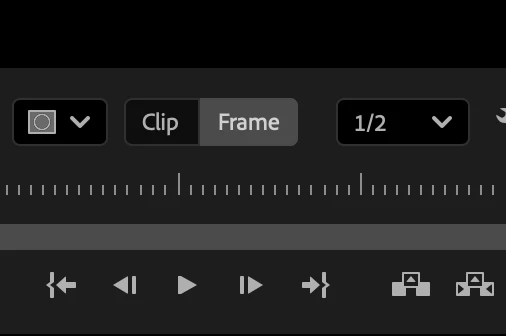
Ensure you’re making frame-level adjustments (not clip-level) by clicking Mask adjustments affect current frame only in the Program Monitor.


https://helpx.adobe.com/au/premiere/desktop/add-video-effects/work-with-masks/adjust-masks-at-the-clip-or-frame-level.html

2 replies

PaulMurphyCommunity ExpertCorrect answer
Community Expert
April 21, 2026

Ensure you’re making frame-level adjustments (not clip-level) by clicking Mask adjustments affect current frame only in the Program Monitor.


https://helpx.adobe.com/au/premiere/desktop/add-video-effects/work-with-masks/adjust-masks-at-the-clip-or-frame-level.html

Translate
Community Expert
April 21, 2026

Please make sure that the clip is selected in the Timeline.

Translate