
Participant
Mar 1, 2024 3:43 PM UTC
Question

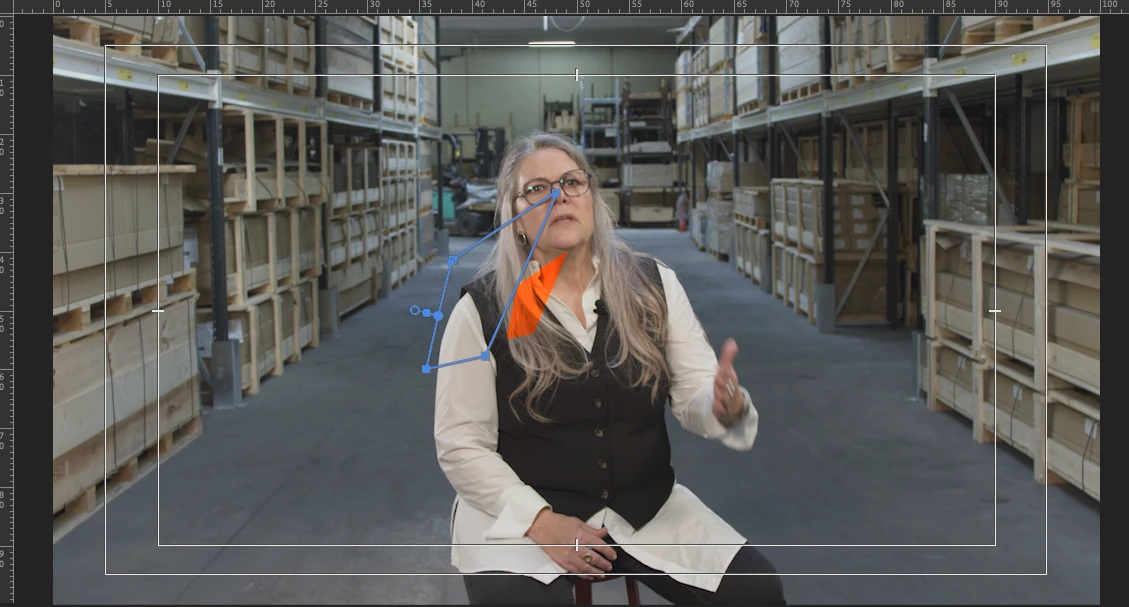
Mask smaller and off centred.

Hi, when I make a ajustment layer mask in Premiere Pro, the mask becomes samller and slighty moved to one side. I have attached a screenshot showing the outline of the mask and the result of the mask (turned the color of the mask orange so easier to see the differnce)


I've tried making a new project, clearing catch files, updating software and so with no luck.
 

This topic is closed to new replies. Start a new post to keep the conversation going.

2 replies

R Neil Haugen
Legend
Mar 1, 2024 5:23 PM UTC

Ann's comments about both recommended screen scaling and AL framesize are correct. Both can influence this.


A lot of user's don't realize ALs have framesize. They are created at the framesize of the originating sequence.


Also, I've seen the use of "crop" or transform have interactions with AL sizing things. At times, nesting then applying masking or reversing, applying masking/nest then sizing may be needed.

Translate
Everyone's mileage always varies ...
Ann Bens
Community Expert
Community Expert
Mar 1, 2024 4:49 PM UTC

Please post comp specs, Premiere version and build.
Also screenshots of MediaInfo info in Treeview on footage used, sequence settings

https://mediaarea.net/en/MediaInfo


Make sure your OS display scaling is set correctly as in recommended.

Is adjustment layer same dimensions as sequence settings?

Translate