This topic has been closed for replies.

2 replies

Kevin J. Monahan Jr.
Legend
April 23, 2019

It's a feature request, Suicide. Upvote here to add more traction to this idea: ENHANCEMENT: Effect Masks on Master Clips – Adobe video & audio apps

Hope those with interest in this post can also upvote.

Thanks,
Kevin

Kevin Monahan - Sr. Community and Engagement Strategist – Adobe Pro Video and Audio
Ann Bens
Community Expert
Community Expert
April 21, 2019

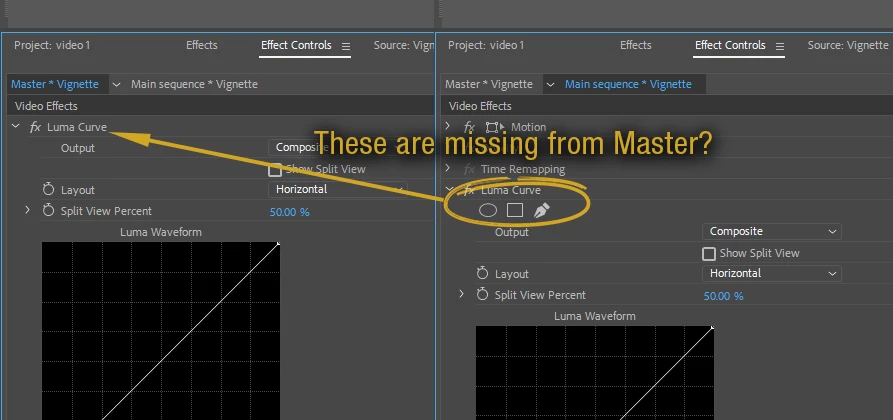
No they are not missing as there never was a mask feature in the Master Clip tab.

Lee JamesAuthor
Known Participant
April 21, 2019

Oh, OK. That's totally odd.

In that case, how are you supposed to make a global Adjustment Layer - one where you can change every instance of it just by changing the master?

For example, I'm just trying to create a simple "vignette" Adjustment Layer, using the Luma Curve effect masked with an ellipse. I want to be able to drop that "vignette" over several clips. How does one go about something like this?

R Neil Haugen
Legend
April 21, 2019

The Master Clip is designed to be global corrections. So masking and a number of other things aren't included.

You can add effects to a Master Clip as you wish, so add a crop and feather it or some other such effect.

Neil

Everyone's mileage always varies ...