



Masking - Pen Mask tool issues
Hello.
Any assistance appreciated, thank you.
When creating a mask using the Pen Masking tool I have the following issues:
>It takes a few attempts of drawing the mask for the Program Monitor to show the mask which has been created.
>When the mask does appear on the screen, I copy the mask from Unassigned Masks to the Effect I want to apply (for instance - Lumetri Color) and then adjust the settings in that Effect. So far so good (if slow compared to creating Masks in previous versions)..
>But...If it’s a moving shot I need to manually track the Effect and its Mask. However with this new masking tool I can’t seem to apply Keyframes so that the Mask can track with the shot. The auto tracking tool (the Mask Forward play-shaped button) just does its own thing and isn’t useful.
Therefore I can’t track an effect, which is increasingly rendering masks very restrictive. It used to be such a simple process creating masks to apply to clips in the timeline and Effects, it was quick, with few steps and essentially worked every time. Now it appears to be buggy and the usability has gone right down.
I appreciate the potential of AI-masking element which identifies shapes automatically, but the problem is that is great for Photoshop and static shots, but the tool starts to fall over quickly when you introduce the variables with moving shots - changing lighting, moving shots, etc etc.
However, is there something I’m missing with using the Pen Masking tool so that I can get the mask to track manually please?
For reference below is an image of the Effects Control showing two Keyframes which appear when I click the clock icon (in blue) but then I cannot apply any other Keyframes.

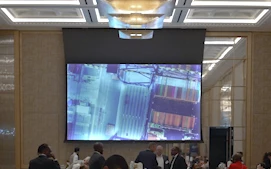
And here is a zoomed-in screenshot of shot I’m trying to apply Lumetri Color too. I am trying to bring down the Highlights and Brightness of the projector screen while maintaining (and tweaking up) the brightness and Shadows of the rest of the room. The shot is a rise up and is not static. And the Mask won’t track with the movement.
Premiere V26.0.2 Build Two.
The computer is up to spec, decent RAM, graphics card etc etc.
Thanks.
 AdChoices