

Bed30321077z973
Inspiring
February 5, 2024
Answered

Maximum number of audio tracks is ONLY 5? - And what is the purpose of the mix tracK?

  • February 5, 2024
  • 1 reply
  • 2065 views

Hello,

I am trying to add an audio to a SIXTH audio track manually,

But I can't, the cursor (which we cannot see in the screenshot) shows a hand with a "cancel" button, indicating the impossibility to add the audio BELOW A5,

I was expecting to drag the audio below A5 and be able to create A6, like I did with A4 and A5, but it does not seem to work that way?
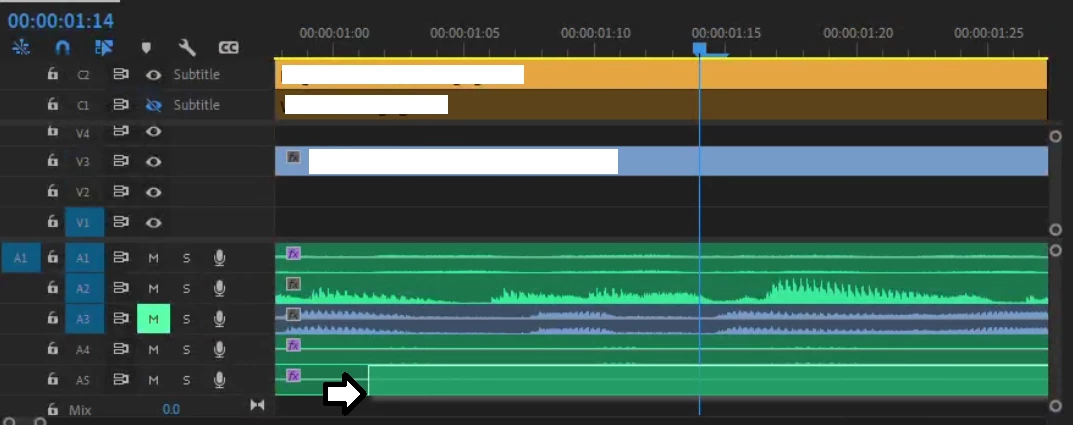
 

The audio I want to add would always fall on the last track (see the screenshot) OR if I move it below A5 too much, it will do nothing (hand with a cancel button cursor).

Why are we restricted by this number?

While writing this post, I noticed the mix track, I wonder if this can help, what does it do anyway?

Than,ks

This topic has been closed for replies.
Correct answer Bed30321077z973

Hey thanks for your message,

My bad it was my fault, I had to use the tool on the right to make the track look smaller and reveal a space BELOW the MIX track, if you drag an audio there (below mix) it will create the sixth track :), My bad.


1 reply

neil wilkes
Legend
February 5, 2024

Wow.

I am off to check this right away as if this is true then it has got to be a bug, right?

Bed30321077z973
Bed30321077z973AuthorCorrect answer
Inspiring
February 5, 2024

Hey thanks for your message,

My bad it was my fault, I had to use the tool on the right to make the track look smaller and reveal a space BELOW the MIX track, if you drag an audio there (below mix) it will create the sixth track :), My bad.