whamalamaboom
Inspiring
August 30, 2026
Answered

Media Analysis & Transcription disabled but still runs.

  • August 30, 2026
  • 4 replies
  • 23 views

I’m on version 25.6.6. I won’t need assistance with this because this version is problematic enough after updating that I’m reverting back to version 2024. I still wanted to mention that after updating to this version, it now seems to include this AI driven media intelligence analysis, which I didn’t know was a thing until I opened the progress window and saw it running.

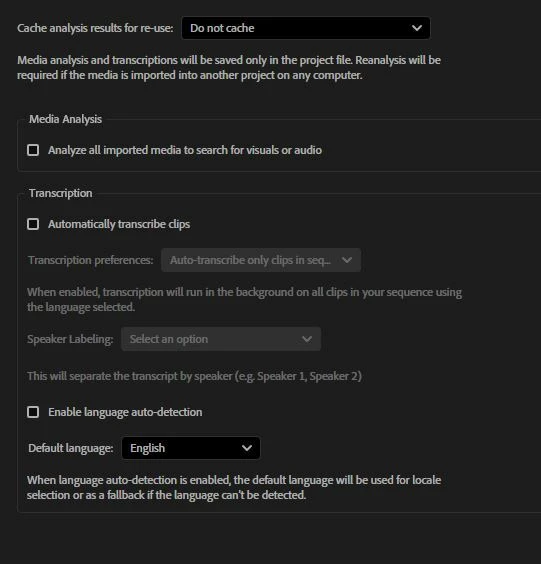
When I went into preferences to find a way to disable it, it was already turned off, so I’m not sure why it ran. Mentioning because if it’s disabled, it shouldn’t be running anyway. Thanks!


Correct answer mattchristensen1

@whamalamaboom Sorry for the confusion here – but I can explain what’s happening. The short version is that if you import media that was previously analyzed and the analysis was cached, Premiere will index that analysis no matter what. The indexing is a very quick step and means you’ll be able to search against that analysis that already existed.


The long answer:

The Media Intelligence process is really two steps. The first step is that each imported media file is analyzed. This is what the “Analyze all imported media...” checkbox controls. If you turn off the checkbox, no new analysis will happen. Premiere by default will cache this analysis in the Media Cache, though you can choose to instead have it written next to the media file as a sidecar .prmi file, or you can set it to not cache at all. This part of the process is more taxing on your system as it uses CPU, GPU, and potentially your NPU or Neural Engine if your system has one.

The second step is then the analysis for each file is put into a single index database for your project. This is what Premiere actually searches when you use the Search panel to find visuals or audio. This is the .prin file next to your project file.

So, what you’re likely seeing is that second step happening, when you import media the already has a cached analysis. The second step is very fast, isn’t taxing on your system, and there is no way to turn it off.


4 replies

mattchristensen1
Community Manager
mattchristensen1Community ManagerCorrect answer
Community Manager
September 1, 2026

@whamalamaboom Sorry for the confusion here – but I can explain what’s happening. The short version is that if you import media that was previously analyzed and the analysis was cached, Premiere will index that analysis no matter what. The indexing is a very quick step and means you’ll be able to search against that analysis that already existed.


The long answer:

The Media Intelligence process is really two steps. The first step is that each imported media file is analyzed. This is what the “Analyze all imported media...” checkbox controls. If you turn off the checkbox, no new analysis will happen. Premiere by default will cache this analysis in the Media Cache, though you can choose to instead have it written next to the media file as a sidecar .prmi file, or you can set it to not cache at all. This part of the process is more taxing on your system as it uses CPU, GPU, and potentially your NPU or Neural Engine if your system has one.

The second step is then the analysis for each file is put into a single index database for your project. This is what Premiere actually searches when you use the Search panel to find visuals or audio. This is the .prin file next to your project file.

So, what you’re likely seeing is that second step happening, when you import media the already has a cached analysis. The second step is very fast, isn’t taxing on your system, and there is no way to turn it off.

Community Manager
September 1, 2026

Hi there,

Thanks for reporting this. If Media Analysis is disabled in Preferences, but you're still seeing Media Intelligence analysis actively running in the Progress panel, that doesn't sound like the expected behavior.

We've seen some similar reports, so I'll ask the team to take a closer look.

If you happen to test 25.6.6 again, please let us know whether this occurs with a new project as well as projects created in an earlier version.

Thanks,
Kevin

whamalamaboom
Inspiring
September 1, 2026

Thank you!

Community Manager
September 1, 2026

Hi ​@whamalamaboom,

The team asked if you tried restarting the application? Preferences will undergo the changes after doing so. Let me know.


Thanks,
Kevin