
Known Participant
May 28, 2024
Question

Media Cache files saving to C drive and not my Cache drive

  • May 28, 2024
  • 4 replies
  • 2664 views

HI Guys


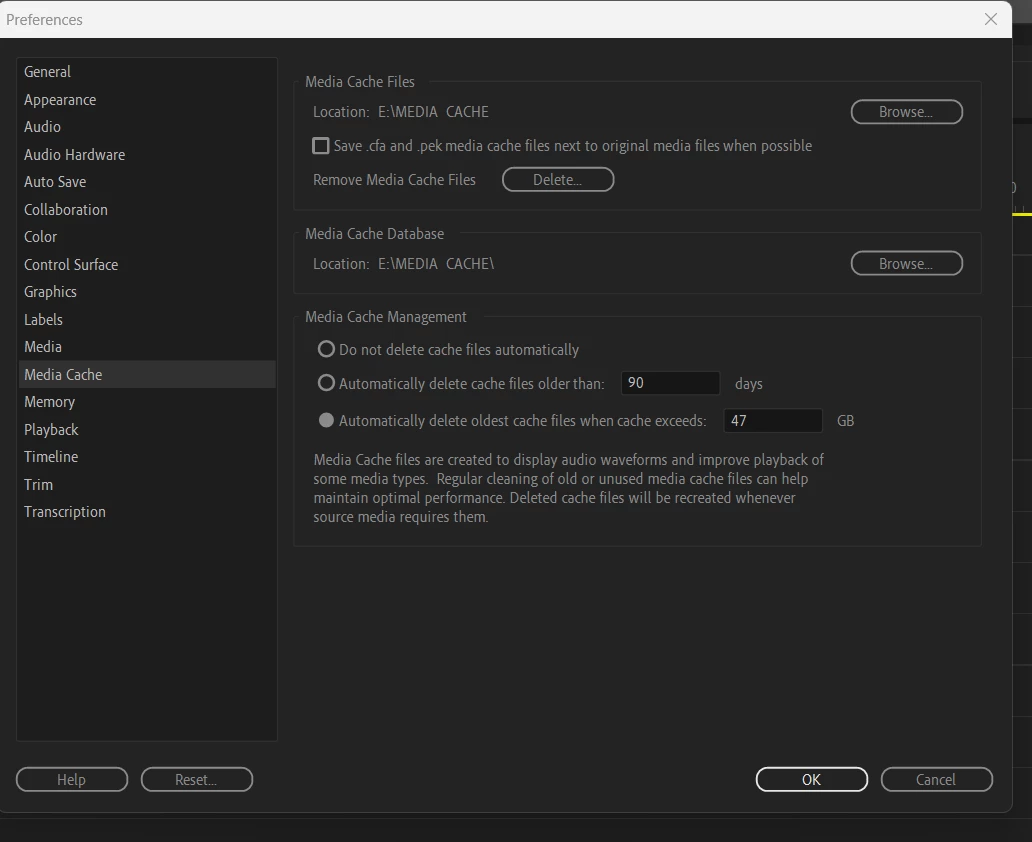
Today i noticed that Premiere is saving media cache files to my C drive Drive C:\Users\shoot\AppData\Roaming\Adobe\Common\Media Cache Files


And not to my dedicated Media Cache drive.  E:\MEDIA CACHE


No matter how many times i state to save in the E drive, the C drive folder keeps filling up. 


I'm on premiere 24.4.1 on windows 11. 
This topic has been closed for replies.

4 replies

Averdahl
Community Expert
Community Expert
May 28, 2024
quote

No matter how many times i state to save in the E drive, the C drive folder keeps filling up. 


By @SHOOT FIRST CREATIVE


I notice from the screen dump that the Media Cache Files goes to E:\MEDIA CACHE while Media Cahce Database goes to E:\MEDIA CACHE\


That should not cause the issue, but i would start with to change the Media Cache Database location to E:\MEDIA CACHE instead of E:\MEDIA CACHE\ . If it still behaves the same i would delete the Preferences for Premiere Pro by pressing the Shift-key while launching Premiere Pro. Check the "Reset app preferences" in the dialog that pops up and click Continue.


When you reset the Preferences the Media Cache Files/Media Cache Database will still be set to the folder you choosed since Media Encoder and After Effects share this setting.


Did it make any difference at all?


MyerPj
Community Expert
Community Expert
May 28, 2024

(I like splash screen!) 🙂

Averdahl
Community Expert
Community Expert
May 28, 2024
quote

(I like splash screen!) 🙂


By @MyerPj


Thanks! That´s Orvar The Cat checking out the surrondings in summer 1980. 🙂

MyerPj
Community Expert
Community Expert
May 28, 2024

You only need one post with the same answer. I don't know for sure, as I set all my Project or Production settings to an "S" drive, and then to let the c: drive do some work, I leave the cache settings alone. 

I would try two things. One is take out the space in the "Media Cache" folder name. The second, I would try just directing them to the root of your "E" drive, as I have on my settings in the screenshot.

R Neil Haugen
Legend
May 28, 2024

And is E an internal drive, or external via USB/Thunderbolt?

Everyone's mileage always varies ...
Known Participant
May 28, 2024

It's a 1TB internal NVMe drive. It's currently at 245GB

Peru Bob
Community Expert
Community Expert
May 28, 2024

What size is the E drive, and how much free space is there?

Known Participant
May 28, 2024

It's a 1TB internal NVMe drive. It's currently at 245GB.