


Participating Frequently
Jan 17, 2025 9:46 PM UTC
Question

Media Encoder ignoring color space

Working with footage from C70 camera shot today with C-LOG-3 and cine gamut. Shot with HEVC 10 bit 4:2:0 (Full Range). Interpreting the color space as such and everything looks fine.


Go to export it for review via Frame IO - notice that media encoder completely ignores the color space and reverts back to the CLOG3 footage.
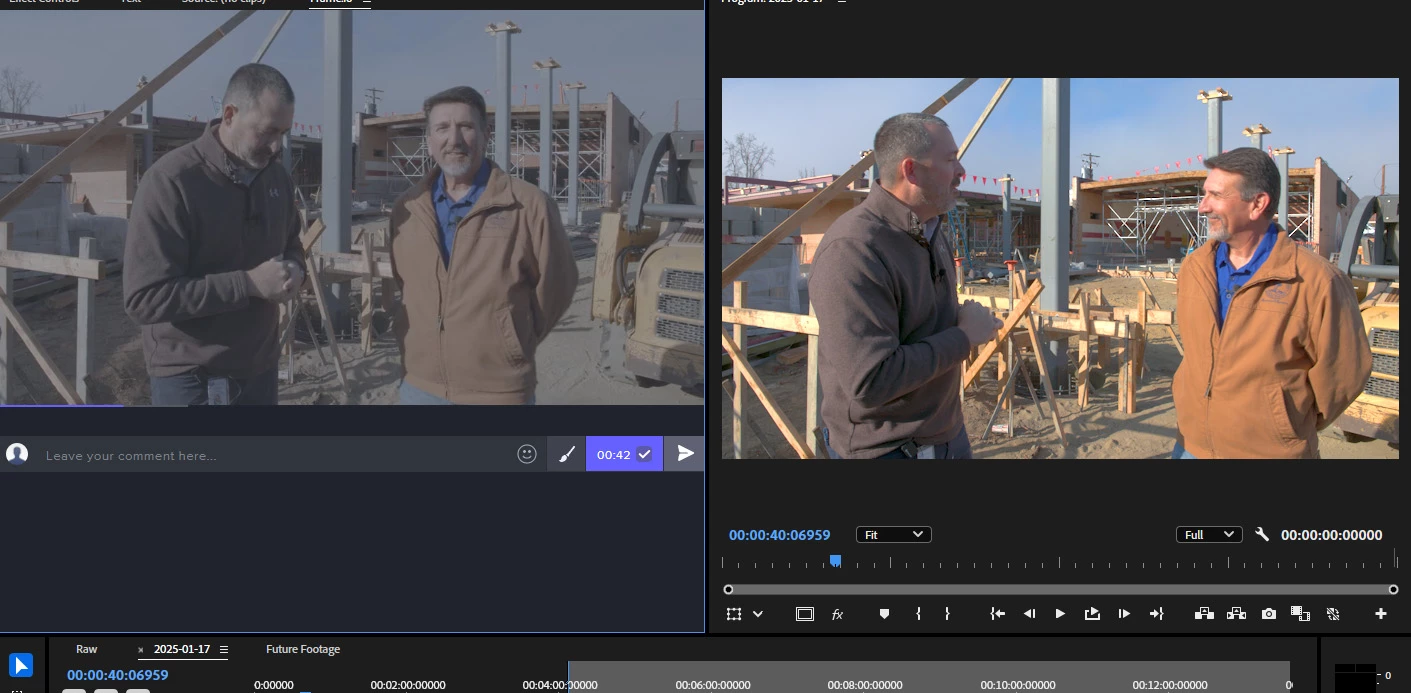
 

Only when I switch to Software Encoding does the render look right. Hardware encoding does not respect the color space change. I reinstalled the latest Nvidia driver - no change.


My sequence color space is Rec 709 - auto tone map is off. Using Tetrahedral as my 3d lut interpolation, viewer gamma 2.2 (web).

My computer

Premiere 25.1.0 (Build 73)

i9 13900K
128GB RAM
RTX 4070 12GB RAM 

NVIDIA Driver: 566.36

16 replies

jamieclarke
Community Manager
Community Manager
Jan 21, 2025 3:15 PM UTC

Hi @Gospel John - I am unable to reproduce this issue.  Can you upload a test file or email to jamiec@adobe.com 

Translate
Participating Frequently
Jan 18, 2025 7:54 AM UTC

Oh - and the Export Settings - I'm just using the "Match Source - Adaptve High Bitrate" Preset with no changes.

Translate
Participating Frequently
Jan 18, 2025 7:42 AM UTC

Interpretting the color space...


Import the footage - right click on the footage - Modify - Color:

Autodetect Log Video Color Space is OFF in PREMIERE

Auto Detect LOG color is OFF in Media Encoder

I tested just rendering straight out of Premiere and bypassing Media Encoder - and it WORKS even when Hardware Encoding is enabled. 


I tried using Shutter Encoder to convert the C70 HEVC file into a ProRes File without doing any color space conversion - imported it into Premiere then interpreted that ProRes file as CLOG3 color space - dropped it into the timeline. Media Encoder handles the ProRes file exactly as expected - no color rendering errors.


It seems to be SPECIFICALLY the HEVC 10 bit 4:2:0 format from the Canon C70 that's causing the issue. I can supply a sample footage if need be to test.

Translate
R Neil Haugen
Legend
Jan 17, 2025 11:14 PM UTC

You need to be specific enough we know exactly what steps you take in order, as otherwise it's just guessing.


So you're applying a LUT to the file in Premiere? Where?


And where is that LUT parked in your system?

Translate
Everyone's mileage always varies ...
jamieclarke
Community Manager
Community Manager
Jan 17, 2025 9:54 PM UTC

Hi @Gospel John - Thanks for submitting your bug report. We need a few more details to try to help with the issue.
When you say Interpreting the color space as such what are your steps in this process?

Can you share a screenshot of your export settings.

Are you using the "Auto Detect Log Video Color Space" in your settings?

Can you check that Media Encoder has "Auto Detect Log Video Color Space" Checked or not.

Sorry for the frustration.

Translate