

mrianwebb1983
Inspiring
October 6, 2017
Answered

Media Encoder opening, but not taking my queue requests from Premiere

  • October 6, 2017
  • 30 replies
  • 75320 views

Hi, I am having an issue with Media Encoder.

When I'm ready to send a sequence from Premiere, I hit "Queue" and Adobe Media Encoder opens, but then nothing happens. It does seem to receive the information from Premiere.

I have uninstalled and reinstalled both programs multiple times.

Any suggestions would be greatly appreciated. 
This topic has been closed for replies.
Correct answer elliottr44927822

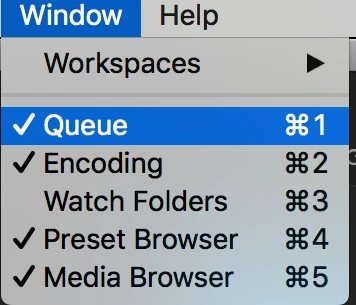
Double check that you aren't looking at the watch folder window pane instead of the queue in Media Encoder. I was having the exact same issue, and then I realized the area that normally shows the queue was the watch folder instead.

To fix, just click the menu: Window>Queue and all of my videos showed up.

30 replies

Participant
February 7, 2024

As far as I can tell this is an issue with the dynamic link between Media Encoder and Premiere Pro. I've solved this previoiusly by dragging the project itself to Media Encoder. However (what I just encountered) if the "Drag Proj file to ME" solve doesn't work, in ME you can go to "File" -> "Add Premiere Pro Sequence" -> Use the finder browser to locate the proj file -> open that way. Luckily this seems to solve the core issue, and so far its a one and done solution (hope to goodness I did not jinx it). Hope this helps!!!

makakobr
Participant
July 2, 2021

I had the same probleblem, but the problem was that I have a VPN working, just turn it off and solved. 

July 2, 2021

Nope. Thanks tho. I've pretty much given up at this point. 

R Neil Haugen
Legend
July 2, 2021

@Kevin-Monahan , any way we can get some help for this user? That's a real pain ...


Neil

Everyone's mileage always varies ...
January 27, 2021

This is still a problem.  I've tried the solutions in the thread.  Nothin'.  Premiere and AME both 2020 version.

bradfordr92955031
Participant
September 27, 2020

I'm pretty late to this thread however I haven't seen an answer yet but this may help. The folder that I was saving the file in had both "." and "/" in the name so I decided to rename it without and this ME issue was resolved

Participant
April 20, 2020
January 27, 2021

Doesn't work for me.  Same behavior.

Participating Frequently
November 5, 2019

Out of curiosity had you deleted the 'queue' from your layout and been left with 'the watch folders' this is a very easy mistake to make and hard to pick up on as they both look the same. Goto window > workspace > revert workspace and your queue should reappear.

Participating Frequently
March 9, 2020

Wow, what a nubbie solution. IT WORKED FOR ME!


My AME window was on Watch Folders and not Queue. OMG. Thank you @makeitmove

Participant
October 4, 2019

The correct answer is that you have to click on the (+) sign underneath the Queue tab, so you can add the source project, which basically means find the premiere project from where you're trying to export your clips, after that, any clips should appear on the queue. 

January 27, 2021

No, that's how you add projects manually.  This is an automatic function initiated from Premiere.  It used to work for me, now it doesn't!

inuyashafan
Inspiring
April 17, 2019

hey all!

i had the same problem. some solutions that worked for me:

1. the file name technique that others mentioned

2. manually clearing your cache

3. restarting your computer

4. installing an older version of each software (not too old or you’ll lose your stuff!) — also make sure theyre at the same relative compatible versions (like don’t download 2016 AME and 2018 AFX)

hope this helps even a little!

Participant
January 2, 2019

I had the same problem and did the same steps

in media encoder try: window - revert workspace

that solved the problem for me

Participant
December 24, 2018

All the adobe updates really screwed with everything. I am having the same issue you are here and my after effects render request won't show on AME. I GAVE UP. This is really annoying. And this happened the same time PSD decided to disable constrained transform with the shift key. ADOBE what are you guys doing?