

mrianwebb1983
Inspiring
October 6, 2017
Answered

Media Encoder opening, but not taking my queue requests from Premiere

  • October 6, 2017
  • 30 replies
  • 75320 views

Hi, I am having an issue with Media Encoder.

When I'm ready to send a sequence from Premiere, I hit "Queue" and Adobe Media Encoder opens, but then nothing happens. It does seem to receive the information from Premiere.

I have uninstalled and reinstalled both programs multiple times.

Any suggestions would be greatly appreciated. 
This topic has been closed for replies.
Correct answer elliottr44927822

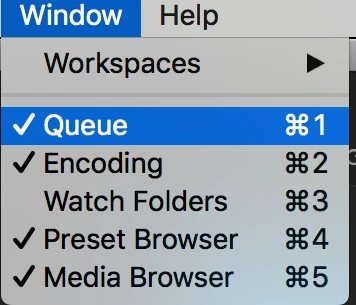
Double check that you aren't looking at the watch folder window pane instead of the queue in Media Encoder. I was having the exact same issue, and then I realized the area that normally shows the queue was the watch folder instead.

To fix, just click the menu: Window>Queue and all of my videos showed up.

30 replies

Participant
February 28, 2018

I am experiancing this issue now on two out of three MACs s at my work.

Reinstalling AME, erasing documents and any workaround seems to not make any difference.

AME is just opening but it is not creating any queue. Sometimes (but not always) it will eventually appear after a quite amount of time (10-20min).

Sometimes the workaround with adding some sequence from the AME media browser can un-trigger the queue, but  in most cases it will just make it freeze.

Sometimes the issue is not even there for no reason and the AME is working just fine for the day.

The weird part is that it started to happen on one of the MACs, about a month after updating all devices to High Sierra and Adobe programs to 2018.

A week later it started to happen on the second one.

Third Mac is working just fine by now, but I really hope that we will fix it somehow.

Exporting files from the program just stops us from any other work.

Participant
March 9, 2018

I am in the same boat with 2018. I have uninstalled and reinstalled Media Encoder and Premiere. No fix.  Media Encoder opens, but nothing queues....

jonathant7518206
Participant
February 27, 2018

try clicking on window and then clicking queue

this worked for me

it wasnt showing the queue then i saw all my files

Orf
Known Participant
March 27, 2018

That was the problem for me. Thanks!

umrans20469863
Participant
February 7, 2018

I had a similar issue, what triggered my problem was, I had to end task in task manager as my media encoder wasn't responding. After doing that neither AE nor Premiere Pro were queuing up my renders. So I just used the media browser inside ME and opened up my PP file and double clicked a random sequence to add to render and thats when my render Q got populated. In fact all the time I was clicking add to render Q and not showing up, all those renders also came into the Q.

R Neil Haugen
Legend
February 7, 2018

Intriguing ... wow.

Neil

Everyone's mileage always varies ...
ryanopena
Participant
January 17, 2018

so Im guessing this issue was never resolved? im on the 2018 version and having this issue.

R Neil Haugen
Legend
January 17, 2018

Most of us are having no trouble whatever with queuing to AE.

And some that were in 2017 aren't with 2018.

So, have you:

- signed out of the CC app, rebooted, signed back in?

- used the CC app to uninstall PrPro and ME, reboot, and install again?

- checked the app's permissions to make sure both are running as administrator?

Neil

Everyone's mileage always varies ...
Participant
June 29, 2019

Make sure you both have them on Administrator and Compatible for Windows 8, worked for me xD <3 yall

michaelp30702559
Participant
January 12, 2018

I was having the same problem, but solved it by doing a "Save As" on my AE file with a new file name before exporting and that worked.

Participant
May 1, 2018

SAVE AS and new name WORKED!!!  Easy Peasy  PS:  I'm using After Effects 2018 and "Add to Adobe Media Render Queue".  All was working until a few days ago but just using SAVE AS and a new file name solved the problem.

Participant
November 3, 2017

Happening to me too.  I'm trying to export without using media encoder and that might be working. How half-assed can they be to break the core functionality of their software?  It's as if MS Word stopped allowing you to print.

caylemweeks
Inspiring
November 3, 2017

Hey mrianwebb1983,

I've been having this same issue over the last few days. It seems to be an issue with the connection between the programs and the dynamic link server. Have you checked out your firewall or any other anti-virus software? Maybe consider making Premiere Pro and Media Encoder two apps that bypass the firewall/anti-virus software completely. When I get back to my main PC, I'll spend a while looking around for a fix for this issue as I know quite a few people are likely experiencing it.

Kind regards,

Caylem.

Known Participant
November 2, 2017

Same problem here.

More problems with CC's latest version. Somebody's asleep at the switch. Never seen so many things going wrong with a piece of software. I guess we've reached the end of days.

mrianwebb1983
Inspiring
November 2, 2017

I never did figure this out, just updated to 2018 and now the issue has been resolved. Very strange indeed.

Known Participant
November 2, 2017

I’m going back to 2017.

UPDATE:  Well, going back to 2017 lost all my .MTS files.

This is a disaster. Not that anyone at Adobe cares.

UPDATE:  I'm restoring my computer back to before the last update. (Fingers crossed) I think I'm going to have to find another editor. I'm still reeling from the impact of Adobe's callous disregard for it's customer base. I've never seen anything like this, but I guess it's not to be unexpected. I'd like to blame Adobe, but that gets one nowhere. The only relevant change will come from me...hence my search for another option. This is what happens when you become too dependent on one solution. Just doesn't make sense in the long run.

On Thu, Nov 2, 2017 at 6:35 PM mrianwebb1983 <forums_noreply@adobe.com>

Legend
October 16, 2017

I recommend Step 2k and 3d below.

Unofficial Premiere Pro Troubleshooting Guide

mrianwebb1983
Inspiring
October 17, 2017

Thanks Jim, but still no luck.

I've updated everything, used the Cleaner tool, cleared all preferences, and still nothing is being sent to my queue. Very concerning as I begin a major production next week. I may have to wipe my system and start fresh.

Any other ideas? Thanks for all the suggestions so far.

Legend
October 17, 2017

Well, maybe try starting with Step 2a and work your way down.

R Neil Haugen
Legend
October 6, 2017

When AME opens, is your file showing up in the queue? It won't actually export the file from AME until you click the green arrow to start processing, btw ...

Neil

Everyone's mileage always varies ...
mrianwebb1983
Inspiring
October 6, 2017

Hi there,

No, nothing shows up in the queue. AME just opens, but then nothing shows up.

R Neil Haugen
Legend
October 6, 2017

From the Help/About menu items, could you post your program numbers for both PrPro & AME?

Everyone's mileage always varies ...