
Participant
April 9, 2018
Answered

Media Mismatch in Version 12.1.0 (Build186)

  • April 9, 2018
  • 12 replies
  • 8164 views

Adobe Creative Cloud notified me there were updates to most programs. After updating to 12.1.0 my sequence footage is unlinked. When trying to link the media I get the following message:
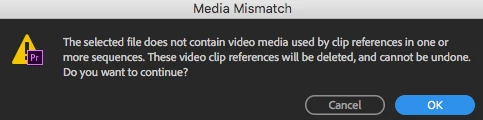
"The selected fild does not contain vvideo media used by clip references in one or more sequences. These video clip references will be deleted, and cannot be undone. Do you want to continue?

Is there any way to link that media or do I have to start entirely from scratch???

This topic has been closed for replies.
Correct answer andyr10794711

I found a way to solve this! I had to rename the source folder of the clips and suddenly the clips would work. Sometimes that doesn't entirely work so I would then duplicate that original source folder and use that new copy to link media to the project. A huge pain because sometimes you have to link each clip individually within that folder.

I had spoken with Adobe and learned they'd supposedly be patching all these known errors by today, April 18th. We'll see...

12 replies

Known Participant
April 9, 2018

Try renaming the folder that the media is in.

Also, delete the Media Cache and Media Cache Files.

I have this problem (with audio) every time I update and this has solved the issue.....this trick may also work to solve it for video also?

Participating Frequently
April 18, 2018

This worked for me:

  1. Shut down all Adobe applications
  2. Delete the "Media Cache Files" & "Media Cache Database" folders.
    Default locations listed below, or go to Preferences -> Media Cache to se where they're stored
    /Users/USERNAME/Library/Application Support/Adobe/Common/Media Cache
    /Users/USERNAME/Library/Application Support/Adobe/Common/Media Cache Files
  3. Start Premiere and re-link. You will no longer receive the "file does not contain video media" error.

Hope this helps! Thanks for the suggestion Runamok_USA​ and tamaras35015672​!

Participant
November 19, 2022

This worked, Thank You 

You saved my day.

Inspiring
April 9, 2018

Support was dropped for some older codecs.  What codec is the footage?  You may need to convert it outside of the Adobe universe to a new codec, then re-link.