


Memory growth with Intel HEVC decoder acceleration (both Premiere and ME)
Hi, I recently build a comuputer with the following configuration:
i7 10700K with Intel UHD 630
32 GB memory
Nvidia RTX 3070
Tried drivers:
Nvidia: 461.92 and minimal from adobe recommendations: 461.86 (studio driver)
Intel: 27.20.100.9316 and minimal from adobe recommendations: 27.20.100.9316
And bumped into the plenty of problems with GPU accelerations. Here my tries with different configurations.
(1) My first try was to do the following:
1. Enable hevc decoding on intel and nvidia
2. Use CUDA for playback
Such configuration does not work for long renders (with videos more than 6-8 seconds) and stops randomly with famous error -1609629690. As said in topic, disabling hardware decoding of HEVC helps to avoid such error. Notably, it estimates my videos (which all around 10-15 minutes long) rendering around 10-15 minutes.
(2) Since I have UHD Graphics with Intel QuickSync and Nvidia (Adobe Premiere cannot decode and use CUDA on latter at once), I decided to make the next configuration of premier.
1. Disable HEVC encoding and decoding on Nvidia
2. Enabled HEVC decoding on Intel
3. Enabled CUDA playback
Now rendering was not failing longer time and render was fast (estimated around 8-9 minutes). But I discovered the really strange thing. Now Premier crashes all other applications because memory is growing until system is our of virtual memory (which is configured to be managed by system, so it is usually stops around 150GB) when SSD memory free around 10-20%.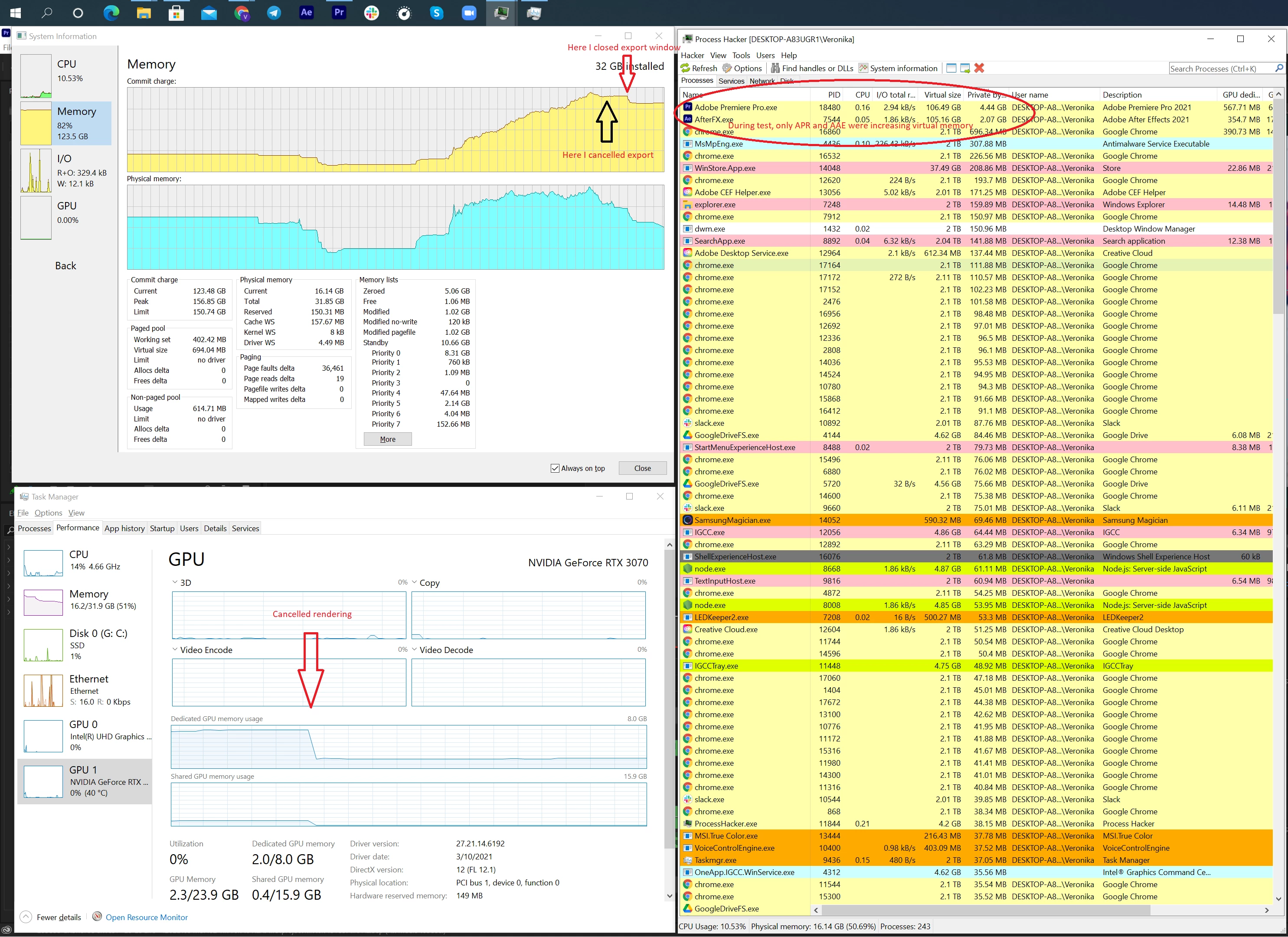
This lead other programs to be closed by system (including google drive) where project is opened from. And as it seen from screenshot, memory is not freed even after export stop and export window closed.
The same problem is seen while playback video in right window in premier but more gradually.
And this is definitely a bug somewhere:
1. In Adobe Premier;
2. In HEVC decoder;
3. In Intel Graphics Driver.
(3) As I have two GPUs, I decided to make an inverse configuration to check where the problem is:
1. Disabled HEVC decoding for Intel;
2. Enabled HEVC decoding for Nvidia;
3. Enabled OpenCL playback.
This worked! Total memory usage is stable at around 30-32GB.
But... of cause using integrated GPU for rendering is really slow. It takes around 1+ hour to render 11 minutes movie. Also, with such configuration RTX 3070 is useless.
(4) As a sanity check, I tried:
1. Enabled all accelerations in hevc encoders/decoders;
2. Use Software rendering playback instead of CUDA or OpenCL
This worked 1.5 hours... but overall memory usage was also around 30-32GB.
(5) This one I tested for fan:
1. Enabled only Intel hevc decoder;
2. Use OpenCL playback
This configuration shortly crashed premiere after export has started ...
Well, I tried many things for this setup but all lead to such a strange memory usage. Such as setting up other versions of Premiere/ME/After Effects. Clean up caches, clean up whole adobe cc with cleaner tool.... But all lead to the same result unfortunately.
Would be really nice, if someone from adobe could help here, please. Because problem seems to be not trivial.
 AdChoices