
LongHaulMDG
Inspiring
March 26, 2017
Question

Mercury Transmit not working after switch to 4k monitor

  • March 26, 2017
  • 4 replies
  • 859 views

Hey

I have a 3 monitor setup which I've been successfully using with monitor 3 enabled for Mercury Transmit, with full screen preview.

Then I upgraded monitor 2 to a UHD resolution monitor and now Mercury Transmit won't work properly - enabling it for monitor 3 puts the preview on monitor 2, much smaller than full screen. Likewise enabling it for monitor 1.

I have the text size on my UHD monitor set to 150%, but even when I set that back to 100% it doesn't solve the Mercury Transmit issue, and also makes it really hard to see any text.
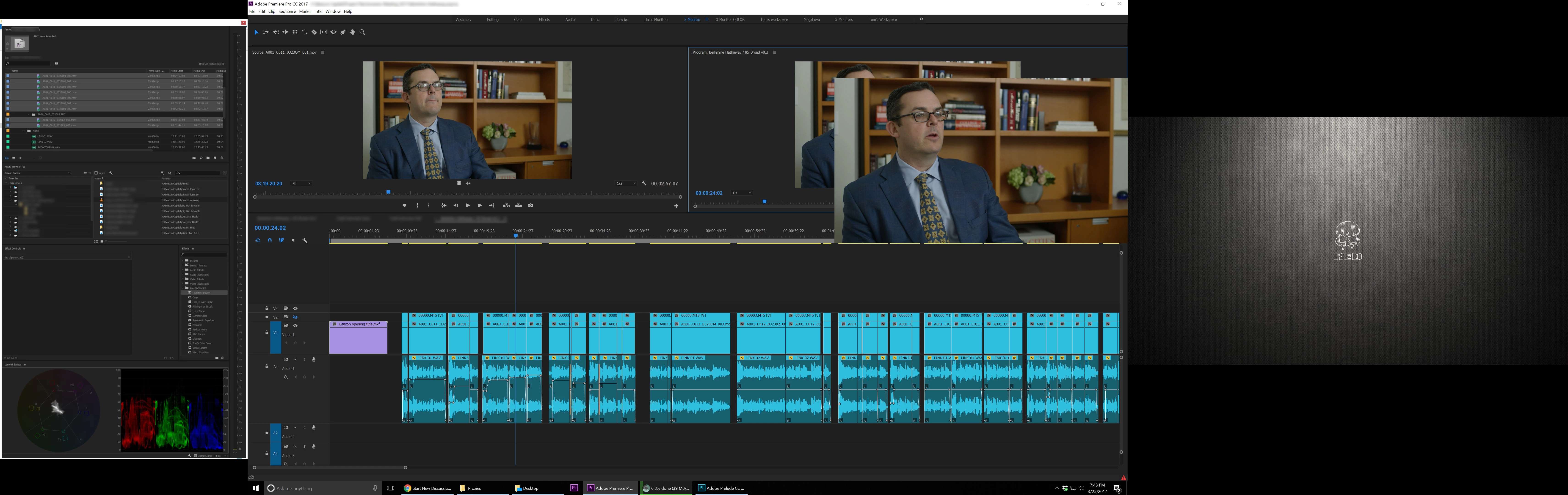
So bummed that this is like this... almost considering moving back to my old monitor.

    This topic has been closed for replies.

    4 replies

    eyeDfy
    Participant
    November 13, 2018

    I also have a 3-monitor setup running GTX 2080ti. My main middle monitor is now a 4k with two 2k on either side. My preview being on the right (see pic). Nvidia drivers are up to date

    Mercury will run fine for about 5-ish minutes then the preview monitor image will freeze. When I toggle Mercury on/off it refreshes to a  black screen. When I toggle on/off again it comes back with the original static image. I have to exit and re-start AE. It then works fine for 5-ish minutes, etc., etc.

    Legend
    March 29, 2017

    One thing I could recommend is to not use the GPU for full screen playback.  Instead, use a proper I/O device from AJA, Blackmagic, etc.

    Inspiring
    March 29, 2017

    Is your display card capable of 4K output? I have an older Nvidia Quadro 5000 card and max rez is 1920X1080.

    LongHaulMDG
    Inspiring
    March 28, 2017

    Bueller.... Bueller....