Known Participant
November 10, 2016
Answered

Merging Clips to appear to be one

  • November 10, 2016
  • 4 replies
  • 1134 views

Hi,

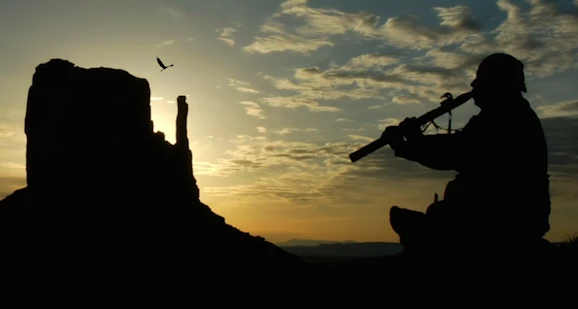
I have 2 clips, one on top of the other. The top one has a bird flying. I would like it to look like the bird is flying in the bottom clip without any of the top clip coming through EXCEPT the bird. Is this possible? I have tried messing around with the opacity and garbage matte but still can't get the results I am looking for.

Has anyone had any success with this type of edit? Any thoughts would be helpful.

Thanks!

ruez
This topic has been closed for replies.
Correct answer Ann Bens

I would take the bird into AE and rotoscope.

Then make the bird all black and quite small to match the mountains.

Or CC the bird and push the black and white level, so you have more of a black and white image.

Set opacity to Linear Burn and mask the bird.

4 replies

Ann Bens
Community Expert
Ann BensCommunity ExpertCorrect answer
Community Expert
November 11, 2016

I would take the bird into AE and rotoscope.

Then make the bird all black and quite small to match the mountains.

Or CC the bird and push the black and white level, so you have more of a black and white image.

Set opacity to Linear Burn and mask the bird.

Mo Alani
Community Expert
Community Expert
November 11, 2016

i didn't know he can use AE 

Mo Alani
Community Expert
Community Expert
November 11, 2016

Put the bird layer above the sunset layer

- Blend mode for the Bird video = Darken

- create a Mask around the Bird

- Set the Mask feather and expansion with the right amount (eye decision)

- Track the Mask

Muhannad,

Mo Alani
Community Expert
Community Expert
November 11, 2016

and i would suggest that you Duplicate the sunset layer(only if its steady shot) and put it above the bird layer and mask the Mountain, then make the bird flu behind it or show off from behind the mountain, like that you give some depth and remove any doubts the bird its not real.

Muhannad,

ruez30Author
Known Participant
November 12, 2016

Thank you Muhannad! I appreciate your graphic explanation. Now I have an idea of where and how to start anyway.

Thanks again.

Val

Ann Bens
Community Expert
Community Expert
November 10, 2016

All depends on the clips. Post screenshots.

Mo Alani
Community Expert
Community Expert
November 10, 2016

is the bird on alpha channel, or green screen, blue screen ?

if not you can mask out the bird and track frame by frame if its short duration.

screenshot the bird video and the bottom video separately to help you better

Muhannad,

ruez30Author
Known Participant
November 11, 2016

They are actually the same size, if that makes a difference. I am trying to make it look like the bird is flying through the sky above the flute. Thanks for any ideas or help ahead of time.