DirkV71
Inspiring
August 2, 2021
Answered

Messages Windows appears outside the Monitor Resolution

  • August 2, 2021
  • 3 replies
  • 439 views

Hi,


if i use Premiere on my MacBook Pro sometime the Message "Project loading" etc. outside the monitor range

and i don´t can see them.


I have already startet Premiere with Option + Comand and the Option method. But both don´t 

help. 


If the any method to tell the right monitor resolution so it show the messages again in the center of the screen?

Thanks for your help.


Regards, Dirk
This topic has been closed for replies.
Correct answer MyerPj

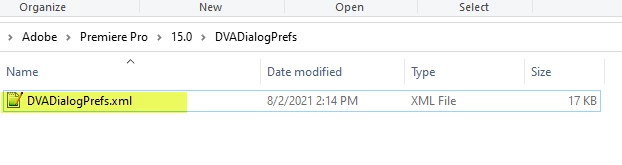
You'll have to translate this link into 'Mac' but there a file in this folder that you can delete or rename, and it will put your dialog postions back to default.


%UserProfile%\AppData\Roaming\Adobe\Premiere Pro\15.0\DVADialogPrefs


Rename this file:


3 replies

MyerPj
Community Expert
MyerPjCommunity ExpertCorrect answer
Community Expert
August 2, 2021

You'll have to translate this link into 'Mac' but there a file in this folder that you can delete or rename, and it will put your dialog postions back to default.


%UserProfile%\AppData\Roaming\Adobe\Premiere Pro\15.0\DVADialogPrefs


Rename this file:


DirkV71
DirkV71Author
Inspiring
August 3, 2021

Thx. This works!


Path on Mac:


/Users/%user%/Library/Preferences/Adobe/Premiere Pro/15.0/DVADialogPrefs


Best Regards,


Dirk

MyerPj
Community Expert
Community Expert
August 3, 2021

Great! 🙂


Thanks for the Mac link, that should help someone passing by sometime.


🙂


MyerPj
Community Expert
Community Expert
August 2, 2021

Here's the hardware requirements:

https://helpx.adobe.com/premiere-pro/system-requirements.html


Don't forget the below is for running at 100% scaling. If you've upped that, say with a 1080p monitor, it might change your visible resolution to below the minimum.


Monitor resolution    

1280 x 800

1920 x 1080 or greater

MyerPj
Community Expert
Community Expert
August 2, 2021

What is the monitor resolution? Does it meet the minimum, and that includes if you have any monitor scaling from the OS.

DirkV71
DirkV71Author
Inspiring
August 2, 2021

Yes. I use the native MacBook Resolution and it

is greater then the minimum requirements....