


Known Participant
November 28, 2017
Answered

Metadata column order, again

  • November 28, 2017
  • 3 replies
  • 2803 views

Why does the column sort order change in the project panel when opening new bin views or changing the schema. I have read the "save a workspace" stuff. That is not reliable nor useful..

Additionally when opening different schemas I need the column order I set for that metadata display to repeat exactly as I had originally ordered it. No matter the workspace, the number of bins, etc.It is a complete waste of time to have to re-sort every time I change a schema.

This is a very logical (almost inherent in the whole concept of schemas)

Thoughts?
    Correct answer Meg The Dog

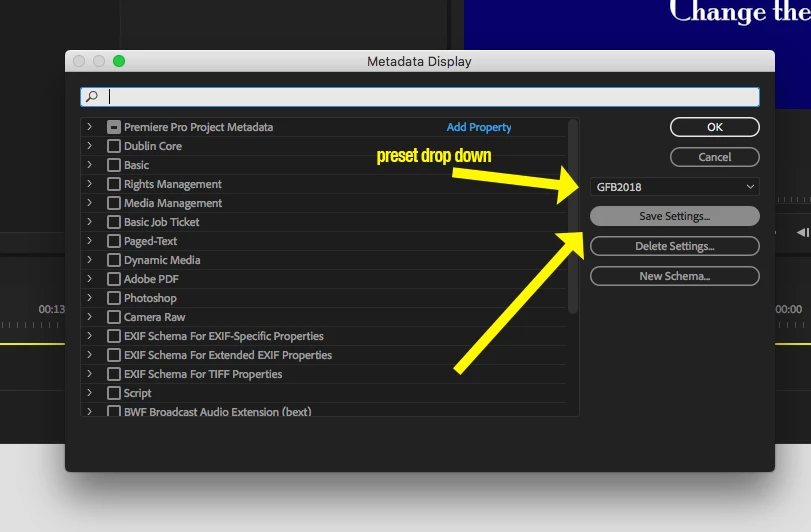
    Configure the metadata as you want, then in the metadata display panel, save the setting. The new saved setting should appear in the presets dropdown window.

    Now open a new bin and the metadata should be displayed as the saved preset calls for:

    Works correctly on my Mac.

    MtD

    3 replies

    kims_schley
    Participating Frequently
    August 11, 2018

    Just ran into this issue also. Can`t be so hard to fix this.

    Would this be considered a bug fix or feature request?

    Hello Adobe ??  Last entry from DMH79  07.05.2018   ....its August now !!

    Meg The DogCorrect answer
    Inspiring
    August 11, 2018

    Configure the metadata as you want, then in the metadata display panel, save the setting. The new saved setting should appear in the presets dropdown window.

    Now open a new bin and the metadata should be displayed as the saved preset calls for:

    Works correctly on my Mac.

    MtD

    Known Participant
    August 11, 2018

    It  will recall the correct columns, but not in the correct order.  Any columns you select beyond the defaults will recall on the far right, even if they were the first column when you saved.

    adobebp73840461
    Participating Frequently
    April 24, 2018

    I have the same obnoxious problem as you. You setup a metadata display for your project and then any time you open a bin in a new tab or window - OR - close and reopen the project, all of the columns resize and place themselves however they see fit and ignore your configuration. Reset to saved workspace helps but it's pretty lame fix to the issue.

    Inspiring
    May 7, 2018

    adobebp73840461  wrote

    I have the same obnoxious problem as you. You setup a metadata display for your project and then any time you open a bin in a new tab or window - OR - close and reopen the project, all of the columns resize and place themselves however they see fit and ignore your configuration. Reset to saved workspace helps but it's pretty lame fix to the issue.

    This issue is really annoying. Adobe, how do we keep a saved metadata display from resetting every time a project is closed and then reopened? Also occurs when you open up a folder in the project panel in a new tab/window. Would this be considered a bug fix or feature request?

    Legend
    November 28, 2017

    What does "opening new bin view" mean.  Just...opening a bin?  Or something else?

    Known Participant
    November 28, 2017

    holding a modifier key to open an instance. Anytime I reopen a project or change the folder (as just indicated) the sort order is not the same.

    Legend
    November 28, 2017

    OK, that's just opening a bin.  Adding the word "view" confused me, because you don't "open" a view, you "change" it (from Icon to List, for example).

    So you're saying that if a bin is sorted by Column B when it's closed, reopening will show it sorted by Column A?