Participating Frequently
May 15, 2024
Answered

metadata display and date sorting

  • May 15, 2024
  • 1 reply
  • 627 views

Todays' puzzle:

My next challenge is to deal with the metadata column (creation date) that keeps disappearing in the project window column (even though I reset it constantly).  This happens every time I quit the project, which means that I need to reset the metadata parameters several times a day.  Also, even more problematic, is how the "sort" feature (which I need to maintain in the "creation date / icon" setting for one of my projects, becomes "unsorted" every time I switch "editing" to "colour" or "audio".  This is a huuuuuge pain and time waster.  Also, the main project page resets to the "base setting" with all of the folders closed (even thought I have multiple folders open (footage, music, sequences, etc). 
This topic has been closed for replies.
Correct answer gerikp

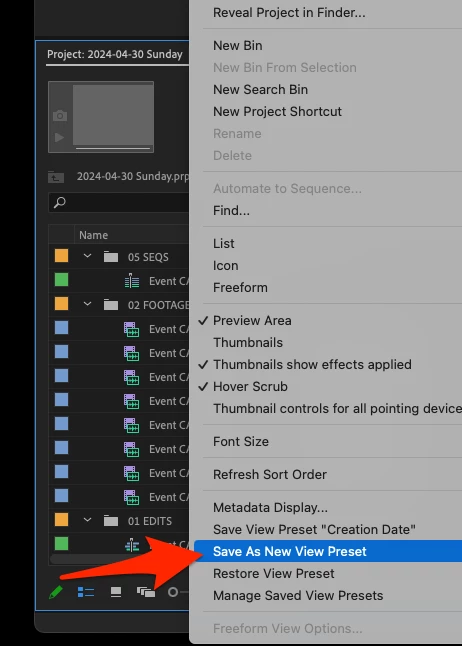
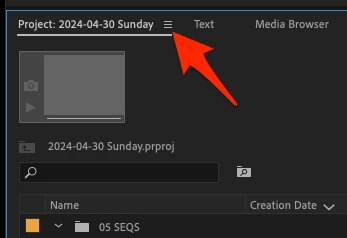
I've handled this by creating View Presets and assigning a keyboard shortcut to it. You can do this by setting up your metadata and sorting it, then right-click on the Project Panel Hamburger Menu (three horizontal lines) and pulling down to "Save As New Preset."


1 reply

gerikp
Community Expert
gerikpCommunity ExpertCorrect answer
Community Expert
May 17, 2024

I've handled this by creating View Presets and assigning a keyboard shortcut to it. You can do this by setting up your metadata and sorting it, then right-click on the Project Panel Hamburger Menu (three horizontal lines) and pulling down to "Save As New Preset."


Participating Frequently
May 20, 2024

Thank you!  This absolutely works.  Since I currently need the icon view  sorted by creation date metadata, I was also able to save an "icon view sort", with a corresponding keyboard shortcut.  This still seems like a silly workaround, but it's a much more efficient option:)). Really...thank you.

Now if only someone at Adobe could explain why all the folders reset to "neutral" after a panel view change (audio, colour etc).