
jakobean
Known Participant
December 1, 2019
Answered

Metal not working on brand new Macbook. Bug, hardware issue, or something else?

  • December 1, 2019
  • 7 replies
  • 4548 views

Hi all,


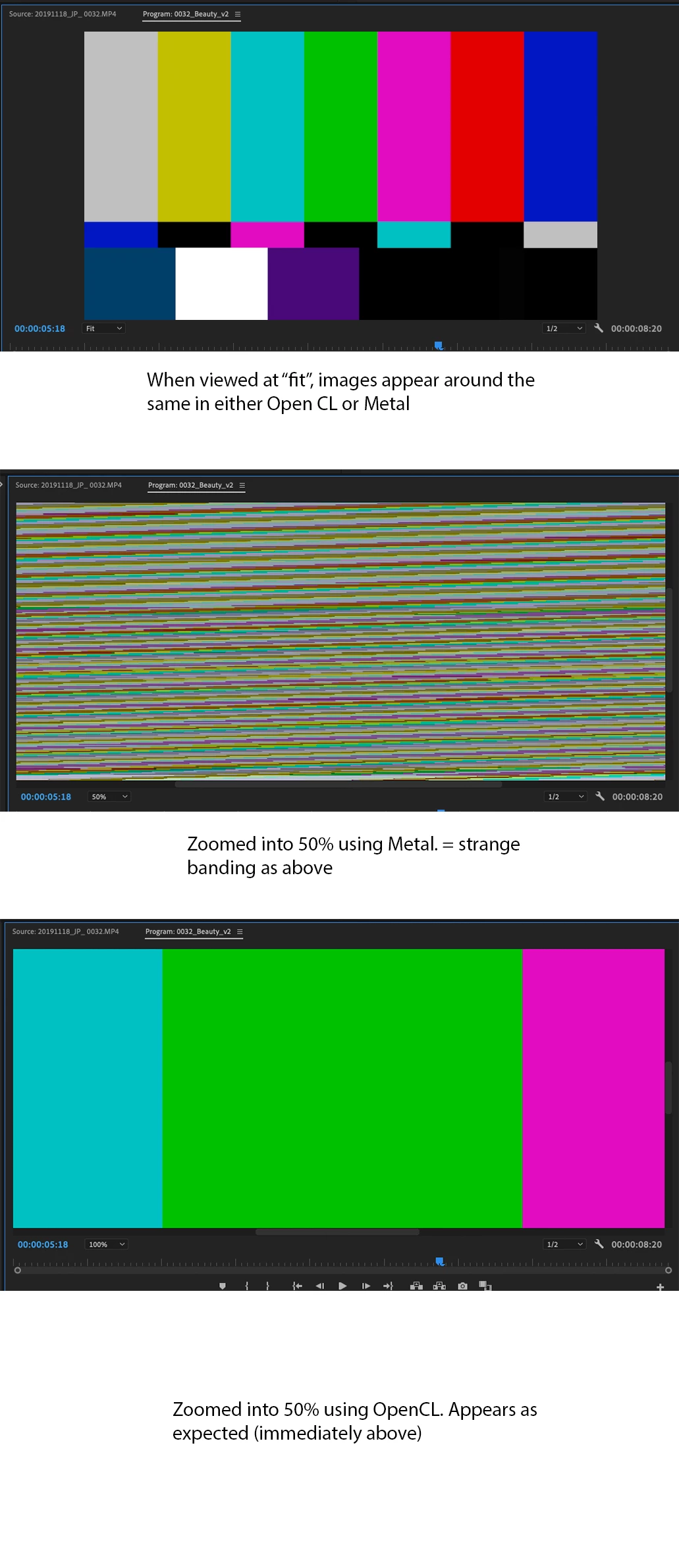
I'm having issues with Premiere when set to use Metal. The image below hopefully explains it pretty well. When zooming into a clip (either program our source) while using Metal, the image does not render properly.


This is a new 16" Macbook Pro. I downloaded earlier versions of Premiere, and experienced the same issue.


It *seems" to me that things work fine with OpenCL (Haven't worked with it long enough to determine if performance is taking a hit). However with this being a brand new machine, I want to learn more about the issue while I'm still in that potential return window. As it turns out, I'm no expert in terms of graphics cards/computer hardware.


Questions I have are: Is this a bug that will be squashed down the line? Does it point to faulty hardware? It seems OpenCL is being deprecated, so I'm also concerned that I'm not getting the performance out of this machine that I paid a pretty penny for...
 

This topic has been closed for replies.
Correct answer Cevelik

This Issues has been solved in lates premier pro upgrade.  14.0.3


7 replies

Participating Frequently
July 24, 2020

Called Adobe they said to call Apple to update GPU driver. Apple says the GPU driver is automatically updated with the OSX updates. Im on a Mac Pro 2013 6 core with D500 and im getting a pixel of colored lines around my R3D footage in the timeline and in the export (any codec) when using the metal rendering. If i switch my timeline/previews to using OpenCL then the timeline lines go away, and same with with the export rendering in Media Encoder. There was a version a while back that fixed this but it seems to have broken again in a later version. Apple and Adobe just keep blaming each other. Since it was fixed in a prior version of Premiere/Media Encoder and with Adobe's track record on releasing updates that break a lot of other things, I have a feeling its on their side.


R Neil Haugen
Legend
July 24, 2020

I sympathize with your situation. Apple is requiring vendor partners to deprecate/drop support for OpenCL on Macs, and for those of you with that older kit it's a right royal pain. For many people with even some of the newer gear, the OpenCL option has worked better. But ... Apple is being insistent. And very Apple.


But realistically, that 2013 machine has had a good long run. Seven years in computer-time is back to when there were dragons and T-rexes roaming around. Few PCs would still be in pro production work at this stage. I'd suggest reviewing updated gear at this point.


Neil

Everyone's mileage always varies ...
Participating Frequently
July 24, 2020

To be honest i have no issues with my machine other than when using premiere. Obviously since others are having the same issue on newer machines thats just trying to make an excuse for something not working. Also there are no issues when exporting using metal from DaVinci Resolve. OpenCL is fine for a work around for now but an application we are paying monthly for should be able to sort this out if a free application can make it work.

jakobean
jakobeanAuthor
Known Participant
March 19, 2020

Thanks for the update. Guess it wasn't a matter of having Apple update my drivers as Adobe had suggested 🤷‍♂. I'll take a look and confirm on my side ASAP.

jakobean
jakobeanAuthor
Known Participant
January 3, 2020

This issue persists in 10.15.2 and with the latest Premiere.

CevelikCorrect answer
Participant
March 18, 2020

This Issues has been solved in lates premier pro upgrade.  14.0.3


Participant
December 12, 2019

I'm having similar issues, only when rendering though. Definitely seems to be with the 5500M 8GB card. Crossing my fingers for a quick update! 

R Neil Haugen
Legend
December 12, 2019

When it gives you a specific time-code, that typically means there is something at that moment in the sequence that is causing an issue. You may need to remove effects and redo, or even if the clip data is corrupted in the Premiere database, you may need to delete the clip from the project and re-import it.


Also, dumping the cache and media cache database folders is good.


Neil

Everyone's mileage always varies ...
Inspiring
December 2, 2019

I can't speak for Adobe but I would assume that support for the new AMD Radeon GPU's in the 16" MacBook Pro's might be on the list of future updates? As they are not on the current Adobe list of supported cards I'm not sure if an updated driver is the solution? Can't hurt to pester Apple I suppose. With enough requests it might actually filter through.


As you say Open CL is deprecated technology - however the speed improvements in Metal are about 15-20% so not a huge 'hit' if you have to wait until the GPU is supported. You can also fallback to 'software rendering' if Open CL causes any issues.


Curious to know which graphics card you have in the 16" Macbook Pro - Radeon 5300, 5500 (4 or 8GB memory)?

In the market for a 16" MacBook pro myself so if Premiere Pro is not working ... may hold off.

jakobean
jakobeanAuthor
Known Participant
December 2, 2019

Thanks for the insight guys


The sorts of issues you have are typically GPU driver problems. Fixed by changing those drivers.


I did some more digging around on this. From what I can tell there's no way I can do this myself, but I have to wait (and keep fingers crossed) that Apple will update the GPU driver in a future OS update. Am I getting that right?


As they are not on the current Adobe list of supported cards I'm not sure if an updated driver is the solution?


Yes, I thought that too. The rep I spoke to basically was suggesting that a update driver would be able to *change* my card to one of the supported ones, which is where I figured either I'm completely missing something, or this guy doesn't know what he's talking about. 


Curious to know which graphics card you have in the 16" Macbook Pro - Radeon 5300, 5500 (4 or 8GB memory)?


AMD Radeon Pro 5500M 8 GB.


dutchlight
Participant
December 9, 2019

I have the same problem with the new MB 16, 5500M 8 GB

I can fix it in Premiere by setting the project settings to use OpenCL. But in After Effects nothing seems to work as a fix. Using Mercury software only is not helping. So, Adobe let me down and I can no longer do any AE projects. What a disaster 😞

R Neil Haugen
Legend
December 2, 2019

The sorts of issues you have are typically GPU driver problems. Fixed by changing those drivers.


Neil

Everyone's mileage always varies ...
jakobean
jakobeanAuthor
Known Participant
December 2, 2019

Just to provide some followup insight on this. I contacted Adobe support and we told that it was an issue with having an incompatable graphics card. The suggested solution:


You need to contact the Apple support and ask them to install the drivers which is compatible with the Premiere pro application.... you may share the lists of compatible driver for Premiere Pro application with them and ask them to install the driver which is compatible. They will help you out with it...

helpx.adobe.com/premiere-pro/system-requirements.html#gpu-acceleration


You may also contact the Manufacturers of your drivers and show them your system configuration to them and ask them you need to install the graphic card driver.

According to this support person, NONE of the graphics cards on the new Macbook Pros are compatable with Premiere without installing these drivers.


All of what he suggested seems a little crazy.... 16" Macbooks are not comptable with Premiere? Surely a huge number of people interested in this machines want it to run Premiere. Am I missing something, or should I contact Apple and ask them to install a new graphics card driver?