
Inspiring
July 20, 2018
Answered

mightykilt64 PP Debug Event

  • July 20, 2018
  • 2 replies
  • 1700 views

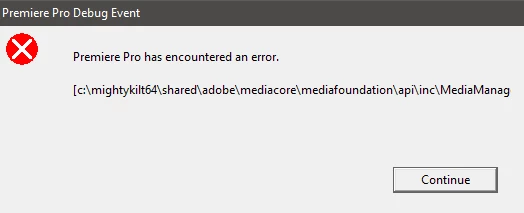
Sometimes I randomly get this error message when I'm working on Premiere Pro CC latest version.

Premiere Pro Debug Event

Premiere Pro has encountered an error.

And guess what, this path doesn't even exist on my computer.

My Windows 10 is installed on drive C:\ but I use drive A:\ for installing my programs so I changed the appropriate registry values for Program Files so all my programs install on drive A:\ by default and so did PP CC.

I don't think there's anything worth mentioning other than that, I'd been using PP CS6 for a long time I've never encountered any error but first day installing PP CC and I get an error! bummer!
This topic has been closed for replies.
Correct answer excited_Genie16B8

Correct me if I'm wrong, But having the OS installed on a separate drive than the drive where your editing programs are installed boosts the performance because this way you won't put all the load on just one drive, SSD's are cheap I don't have a problem replacing my SSD drive (drive C:\).

And I had PP CS6 installed on my A:\ drive past three years and I've never got any error nor had any issue.

I really need to know what this mightyklit64 error means.. it's kinda bugging my mind, and unfortunately I can't replicate it I don't know why I'm not getting the error anymore. I'm scared it might pop up at a time when it shouldn't and ruin my project files.


having the OS installed on a separate drive than the drive where your editing programs are installed boosts the performance

Not really.  It's best to leave the OS and Programs on the main System drive.

What does help is separating the other components.  I used and recommend the following for best performance and easy organization.

C: Windows and Programs

D: Project files, audio files, still images

E: Cache and Scratch

F: Camera media/proxies

G: Exports

2 replies

Legend
July 20, 2018

In addition to Ann's advice, I would recommend Step 3G below.

Unofficial Premiere Pro Troubleshooting Guide

Inspiring
July 20, 2018

Thanks for that useful post, read it whole and tbh I've never move the My Documents folder, and PP CC doesn't have a problem setting up my scratch disks automatically in there I also uninstalled PP CC and cleaned registry with CCleaner and reinstalled the program, issue is still intact.

Ann Bens
Community Expert
Community Expert
July 20, 2018

It is best to install programs on the same drive as window (C drive).

Inspiring
July 20, 2018

My C:\ drive is so limited on storage (since it's an SSD) so that is not an option for me.

Legend
July 20, 2018

So get a larger drive.  Storage space is a necessity for editing.  It's better to accommodate that need than to work around it.