


Blackapino
Participant
July 4, 2023
Question

Missing Codecs

  • July 4, 2023
  • 4 replies
  • 396 views

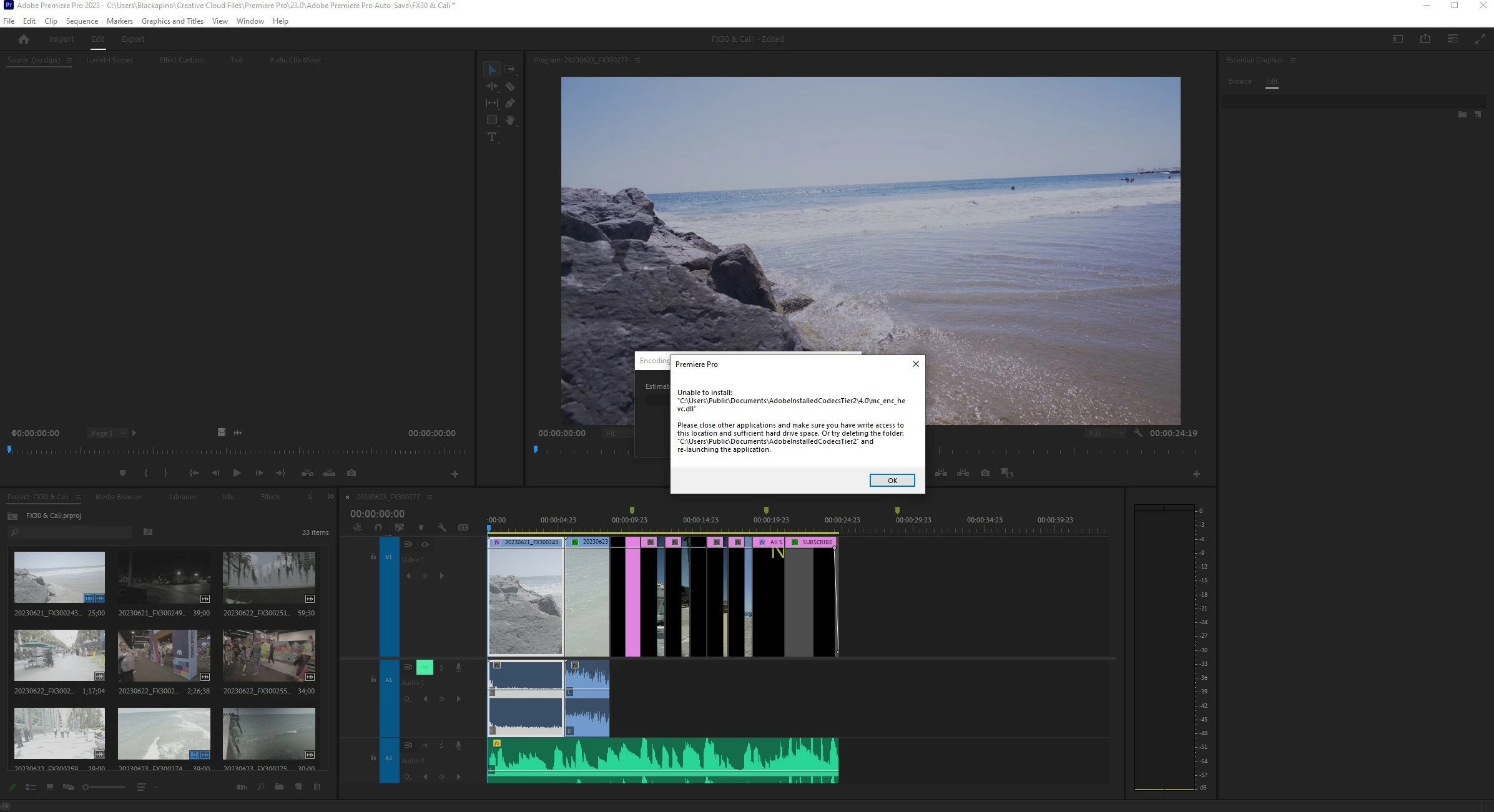
When I tried uploading a Video to YouTube I get this, I haven't the slightest idea what it means, but when I go to check on the File of where this is supposed to be, it's empty and I don't recall ever deleting it. I Can't even Export w/o using Media Encoder. So is there a Fix for this?
 

This topic has been closed for replies.

4 replies

Ishan Y
Community Manager
Community Manager
July 13, 2023

Hi there,

I have moved your post to the discussion section for investigating and troubleshooting. Have you tried running Premiere Pro as an Administrator? Please let us know what third-party plugins you currently have installed (if any).


Thanks,

Ishan

Blackapino
Participant
July 14, 2023

Yes Even uninstalling and right-clicking to Run in Admin didn't help. It's Fine though I'll take a shot video in that File formate and message it when I'm done.

Ishan Y
Community Manager
Community Manager
July 17, 2023

Understood. Could you also share your system specifications (OS, OS version, CPU, GPU, RAM)? Please also let us know what type of storage device you're using and how much free space is left in your drives. 

Blackapino
Participant
July 12, 2023

Actually all those would have worked but they didn't but I found out the solution. I'm Recording on a Sony FX30 and because of Firmware update 2.0 using the File Format XAVCS-HS doesn't work when rendering my videos so I had to put it in XAVCS and Now Premeire Pro works Fine. 

Blackapino
Participant
July 7, 2023

Thanks, and No I'm not on a Trail Version just happened when recently when I guess there was an update. I didn't know there was a Cloud Cleaner thanks.

Ann Bens
Community Expert
Community Expert
July 4, 2023

If you are on a trial version, you can not use H.265.


Otherwise reinstall Premiere and Use the Adobe Creative Cloud Cleaner Tool to solve installation problems