Participant
June 16, 2024
Question

Missing library files Premiere Pro CS6
  • June 16, 2024
  • 3 replies
  • 1046 views

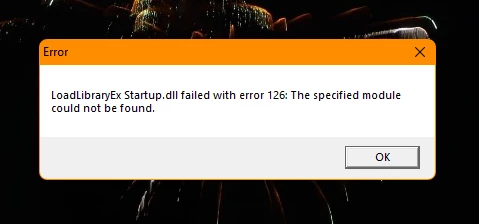
I am on a Windows 11 computer. Recently, I wanted to update my Adobe Premiere Pro CS6 but did not know how to do it. I messed something up but do not remember what exactly I did, but error 126 with Startup.dll always pops up when I run Premiere as an administrator. What is wrong and what must I do so I may use Premiere as normal?


This topic has been closed for replies.

3 replies

Peru Bob
Community Expert
Community Expert
June 16, 2024
Community Manager
June 19, 2024

Hi @Aiden38075800o22s - were you able to resolve this issue and get back to work?

Participant
June 21, 2024

Unfortunately, no. This did not work. My product is not Creative Cloud but Creative Suite 6.

Participant
June 16, 2024

I'm sorry, but that is not the problem. I updated my graphics driver to the highest version today.