
Participant
November 5, 2023
Question

Missing one audio in one frame of GoPro clips in Premiere Pro

  • November 5, 2023
  • 2 replies
  • 232 views

Hi,


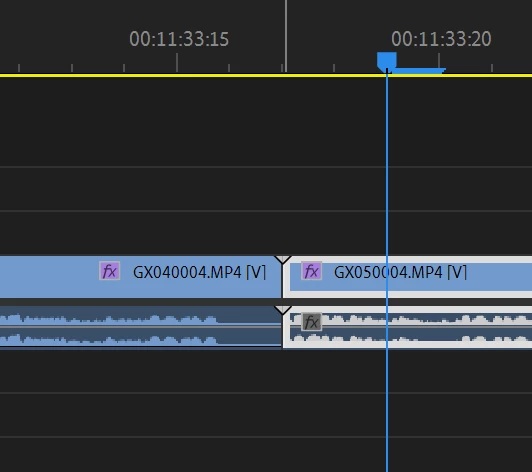
I have recorded a long video on my GoPro and I know that the camera splits the video up into chapters but when I added the clips to my sequence (in the correct order), I could hear a very quick drop in audio between the clips and after zooming in on the timeline I could see that the audio completely drops out for exactly one frame at the end of the clip.


Is there something else I need to do to properly rejoin all the clips to make one video? I have attached a screenshot for reference.
This topic has been closed for replies.

2 replies

Community Expert
November 5, 2023

I see what you are saying now, the audio clip is the correct length but the sound is missing.

As a work around I would time stretch each side of the edit by half a frame.

Community Expert
November 5, 2023

I dont see a frame missing in your screen shot, the blue line under the 00:11:33:20 is the length of a frame.Try switching to audio time units to see the actual length of the dropout.

Avi8orJAuthor
Participant
November 5, 2023
quote

I dont see a frame missing in your screen shot, the blue line under the 00:11:33:20 is the length of a frame.Try switching to audio time units to see the actual length of the dropout.


By @Richard M Knight

It's the audio that's dropping out for one frame - see the end of the first clip. It's doing that on all of the clips. Any ideas?