

BEAN26307660
Known Participant
November 9, 2024
Answered

Missing Text Alignment Tools for Captions in Properties Panel (v25.0)

  • November 9, 2024
  • 4 replies
  • 444 views

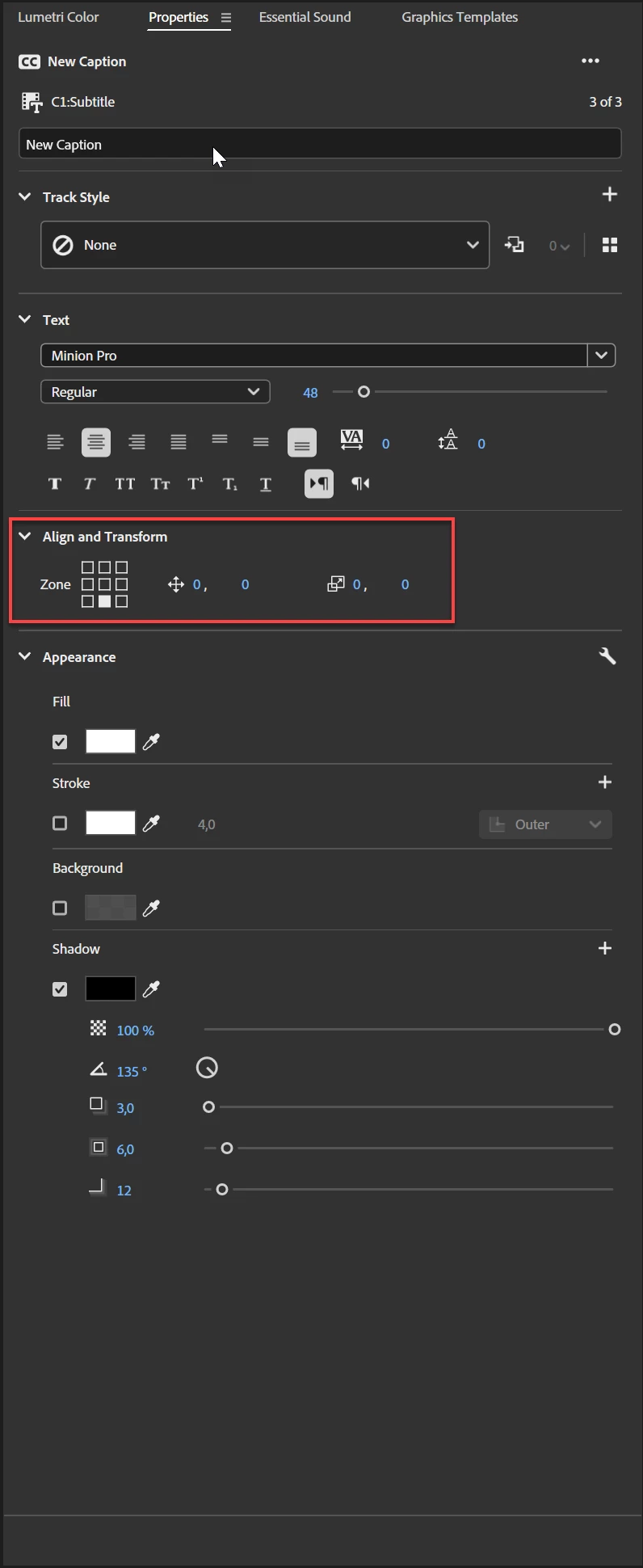
How can I access the alignment tools for captions?


In v25.0, the Properties panel only shows audio and pan options when selecting captions.


I need to center-align captions across a 25-minute timeline but cannot find text alignment tools or the "Align and Transform" section. Resetting the workspace didn’t resolve the issue.


This topic has been closed for replies.
Correct answer Ann Bens

Just select the caption in the timeline.


4 replies

Community Expert
November 9, 2024

It sounds like your selection includes an audio clip. If you select only your captions, it should display all relevant settings for those captions.

Ann Bens
Community Expert
Ann BensCommunity ExpertCorrect answer
Community Expert
November 9, 2024

Just select the caption in the timeline.


BEAN26307660
Known Participant
November 9, 2024

Thank you!

R Neil Haugen
Legend
November 9, 2024

You have to create a text preset first, in the Captions and Graphics workspace is as good as any to start.


Then you right-click on the "Subtitle" word at the left end of the Subtitle track, and the bottom option allows for changes to the track. From the dialog that comes up, you select a text style preset you've already created.

Everyone's mileage always varies ...