Participant
July 29, 2021
Question

missing video filter premier pro

  • July 29, 2021
  • 3 replies
  • 8623 views

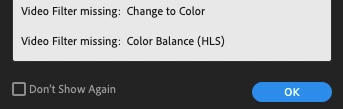
I opened a project I have been recently working on, haven't adjusted any plug-ins or anything to do with premier pro but when I load into the file now it comes up saying I am missing video filters. The effects color change and color balance (HLS) are no longer in premier pro but I didn't delete them. Does anyone know how to get these effects back/fix this missing filter error message. Thanks!
 

This topic has been closed for replies.

3 replies

Participant
May 6, 2022

Adding to the M1 crowd here... I also get the Video Filter Missing dialog and "This project contained a sequence that could not be opened" with most of my perfectly working windows projects

Ann Bens
Community Expert
Community Expert
May 6, 2022

This project contained a sequence that could not be opened


Wow, that is one I have not heard/read in a long time.

https://helpx.adobe.com/premiere-pro/kb/features-presets-missing-premiere-pro.html

Participant
May 6, 2022

tks for the quick reply.


unfortunately, I had already tried all the steps from that thread and the issue is still here

rogert27983815
Participant
March 18, 2022

I also have an M1 Mac and I recently ran into this issue. The project I was working on gave the error message for the RGB and Fast Color Correction video filters which were added to the project on my iMac, which does not have the M1 chip.

Opening the Intel Version of Premiere from the Creative Cloud app seems to have resolved it. Hope this helps!


-Roger

Participant
July 24, 2022

Thanks Roger! "Opening the Interl Version of Pr" saved me.

R Neil Haugen
Legend
July 29, 2021

Those should be in the Obsolete folder, but a few people who all seem to be on M1 Macs have reported not seeing them.


Neil

Everyone's mileage always varies ...
mounttyyAuthor
Participant
August 2, 2021

Hi Neil, 


I checked this and they aren't there either, I do have a M1 macbook but can't locate the effects anywhere thank you though!

Ann Bens
Community Expert
Community Expert
August 2, 2021

It seems on a Mac the effects have been removed.

Either revert to a previous version or replace with Lumetri.