
Participant
July 19, 2024
Answered

Missing Waveforms / Audio in Productions

  • July 19, 2024
  • 2 replies
  • 953 views

I'm experiencing a strange issue with missing audio. My remote editor and I are editing together using identical copies of the same Production and media on two different computers. To share sequences, we follow Adobe's recommended workflow (send / import a new project file containing just the sequence(s) to share). For the most part, everything reconnects correctly. However, some clips show up on the timeline without waveforms, and with no audio playback either. Double-clicking the clip shows no audio in the Source Monitor. However, "Reveal in Project" brings me to the correct Source clip, in the correct project, with the correct audio.


We had a major version of this issue once where NONE of the audio in the timeline appeared, but when we opened up the relevant project files in the production containing all the source clips, the audio started appearing in the timeline. So I suspect this is a Productions issue and not a Media Cache thing, it's not just Premiere's missing waveforms nonsense.


Also I can verify that I am not dealing with duplicate source clips -- the clips in the timeline refer to the correct source clips elsewhere in the Production.


Any hot tips? This is maddening.


PP 24.5.0 on Mac OS 13.6.4
 

This topic has been closed for replies.
Correct answer unrendered_films

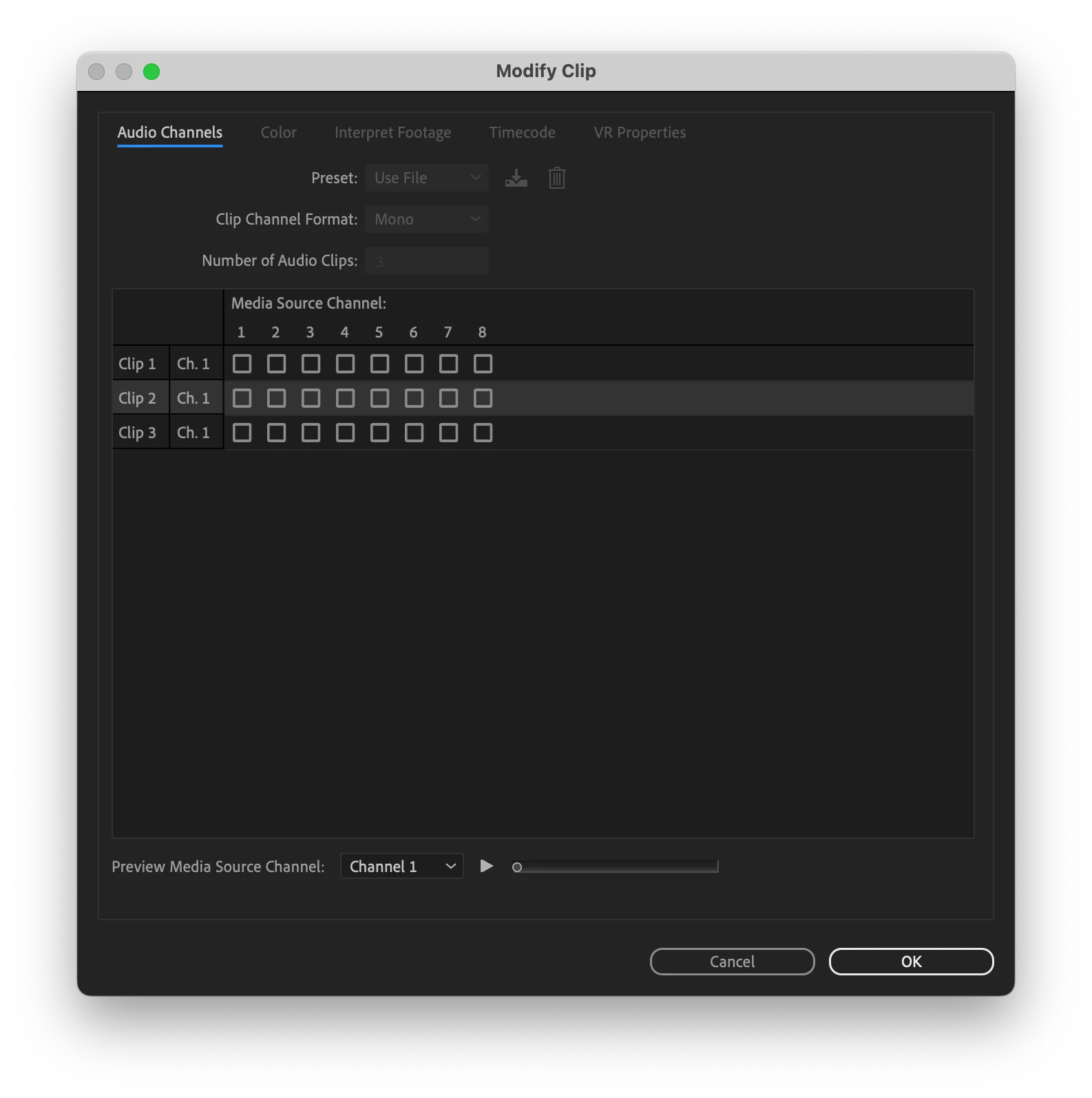
I finally figured it out! Posting this in case it is useful for somebody else. I discovered that somehow the clips in the Timeline has lost all of their channel mappings. Right click > Audio Channels shows that none of the Media Source Channels were mapped to anything. Checking off the appropriate boxes fixed my issue -- brought back the audio and the waveforms.

2 replies

MyerPj
Community Expert
Community Expert
July 19, 2024

Good find! Is that on all the problem clips? What type of media is it?

Participant
July 26, 2024

Yep, the same issue happened on all the problem clips. It was media straight from a Sony FS7, but only when those clips were used directly in the timeline; NOT when they were used as part of a multiclip or nested.

unrendered_filmsAuthorCorrect answer
Participant
July 19, 2024

I finally figured it out! Posting this in case it is useful for somebody else. I discovered that somehow the clips in the Timeline has lost all of their channel mappings. Right click > Audio Channels shows that none of the Media Source Channels were mapped to anything. Checking off the appropriate boxes fixed my issue -- brought back the audio and the waveforms.

Community Manager
July 20, 2024

@unrendered_films Thank you for posting your solution!  This sholdn't happen - we'll look into this.

Participant
July 20, 2024
Thanks! Anything I can provide to help you nail down the issue?

The timeline is fairly complex with many multiclips, nested sequences, etc. Interestingly, the issue happened only to the *simplest* clip items in the timeline, the ones that were just a straightforward single clip with audio and video. It did not happen to the video clips associated to another audio source, or the multiclips, etc. My editor wasn’t experiencing this before exploring the timeline to me, so I suspect the error was introduced during export or import.