Known Participant
September 19, 2023
Answered

modify workspace

  • September 19, 2023
  • 1 reply
  • 330 views

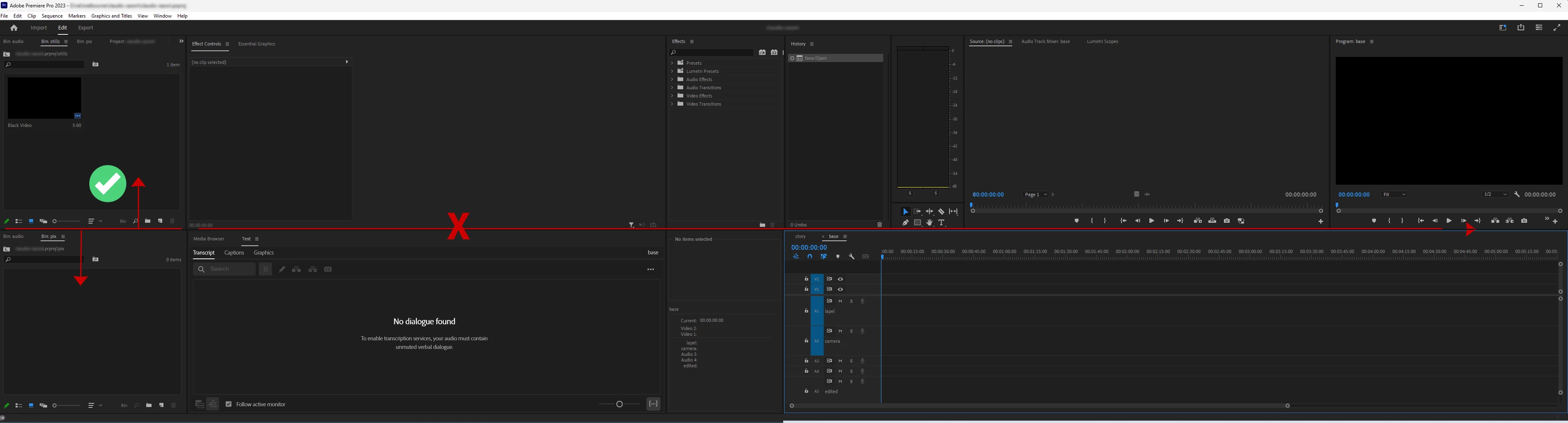
Hi, I've been using PPro for just over 20 years and have always modified preset workspace to create something that suits my work. I now have the workspace below on two screens. It works well. But I used to be able to change the relative height of two windows without affecting all the other windows that share the same horizontal space. In the example below, I used to be able to resize the two windows on the left without affecting the height of the timeline window, or the source monitor and so on. Now I can't find a way to do so...
Anyone knows how? I'd be really grateful... 
This topic has been closed for replies.
Correct answer Ann Bens

Grab the top project window and put it all the way to the left (green line) Its now fills the screen from top to bottom

grab the bottom project window and dock it to the bottom of the top window.

1 reply

Ann Bens
Community Expert
Ann BensCommunity ExpertCorrect answer
Community Expert
September 19, 2023

Grab the top project window and put it all the way to the left (green line) Its now fills the screen from top to bottom

grab the bottom project window and dock it to the bottom of the top window.