


Mono and stereo panning inconsistencies
- Issue - Mono audio pans left and right far stronger/sooner than stereo audio.
- Adobe Premiere Pro version number: 24.3.0 (build 59)
- Operating system - Windows 11
- System Info: CPU, GPU, RAM, HD:
Ryzen 5 7600
2080 ti, 551.76 drivers
32GB DDR5-6000
Multiple nvme and sata drives, some external, plus networked storage shared across team.
- Video format: we typically use H264 mp4 files, audio files are RIFF Wave format
- Workflow details: just adding sound effects to a scene, ambience, incidental foley, etc.
- Steps to reproduce - (Very important!)
- 1- create a new project and main sequence, import the reference mp4.
- 2- import two wav files, one stereo, one mono.
- 3- pan them -50 to the left. the mono file will sound around 45 degrees leftward, but the stereo file will sound far left leftward, maybe 20 degrees ish. depends on the stereo field present in the file.
- 4- use stereo expander on the stereo track, set to 0 (mixing stereo tracks to dual mono basically)
- 5- compare the dual mono to the mono track. results will still be the same, indicating this is not an issue of percieved differences in the stereo vs mono track, but instead how mono and stereo tracks are panned differently.
- Expected result - on at the very least, step 5 should have resulted in a near identical audibly heard pan position, but step 3 should ideally also result in similar positionality than it currently does.
- Actual result - audio panning seems to be linear on mono, but logarithmic or eased out on stereo files.
this makes doing sound to animation a good deal tedious since depending on if the file is mono or stereo, panning behaves differently. again, even a stereo file stereo expanded to 0 (so mixing both channels) pans far slower to left and right channels initially than a mono file, which rules out the possibility of differences in the stereo field causing a percieved difference in pan positionality.
here is a waveform of a stereo mix capture on premiere project playback audio. all sounds are panned to -25.
first sound is standard stereo. middle is standard mono, third is stereo with stereo expander set to 0 (stereo channels mixxed, no stereo field effect)
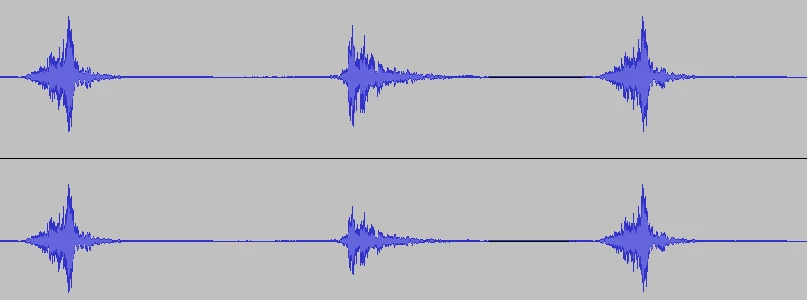
you can see it visually, I'd hope. the mono file has decreseased the volume of the right channel output far quicker than the stereo based files. the stereo files barely pan at all until you hit well past 40-50 on the panning setting, which is what makes me think stereo are handled logarithmically, which is inconsistent.
volume db setting also seems to affect track panning, lowering the volume will make stereo tracks pan even less, but it's barely noticable in most circumstances, and potentially down to how humans percieve audio as I have been unable to visibly reproduce it in a waveform capture.
 AdChoices