Known Participant
June 30, 2017
Question

Morph cut crash troubleshooting needed

  • June 30, 2017
  • 1 reply
  • 1944 views

Read about the Morph cut crashes, and I have it too now. Premiere Pro CC 2017.1.2 v11 sequence rendered with own or Adobe Media Encoder results in an error within PP - and AME  - and both application just plain crashes.

I try to morph cut between two segments of the same source footage, a file called 00043.MTS. Framerate, bit rate etc is identical in other words.

As per the work around suggestion in this thread, I can bypass the problem by pre-rendering the morph cut effect and then select to use Previews and skip use Maximum render quality when exporting.
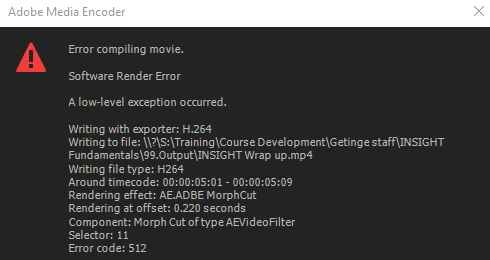
    This topic has been closed for replies.

    1 reply

    CavernFilms
    Known Participant
    January 30, 2018

    Did you figure out why you were crashing? I'm  crashing every time I use morph cut on the most recent version.

    CavernFilms
    Known Participant
    February 23, 2018

    I never figured out why this was happening but Customer service did give me a work around.  So highlight the clips that need to morph and nest them - I've used a keyboard shortcut - I can't remember if I created it or if it was already there, Option n. Then I apply the morph, then I render the clip - using a keyboard shortcut, then I return to the timeline and render the clip and it seems to work. But there is a lot of going back and forth and I always render and wait because this CC2018 seems to crash on me if I ask it to do too many things at once or bogg it down too much.

    Participant
    March 16, 2020

    That doesn't work for me. No matter what I do, when I render the clips, premiere crashes.