Participant
March 1, 2018
Answered

Motion Graphics Template has misspelled font

  • March 1, 2018
  • 2 replies
  • 616 views

Hello I have just started using the Essential Graphics feature in Premiere Pro.

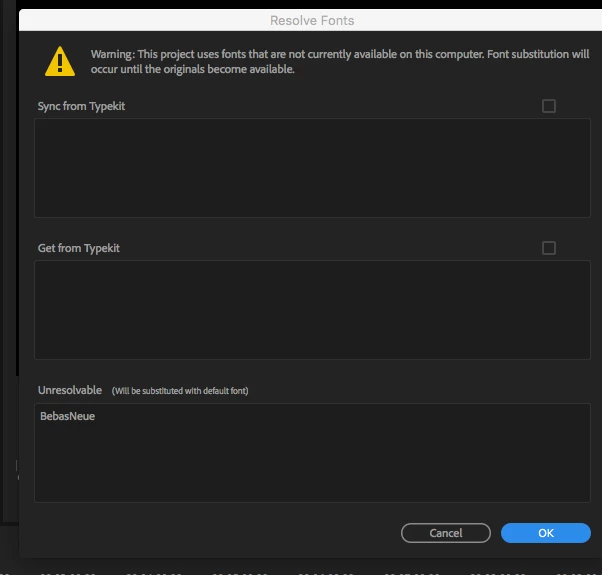
I like it BUT, I want to use a template called "Bold Title" - and it says the font is missing,

and a substitution will be made.  The font name it calls for is "BebasNeue" this is incorrect name it should be "Bebas Neue"

which is available in type kit.  See this image below:  How can I fix this??
This topic has been closed for replies.
Correct answer R Neil Haugen

You may need to just 'accept' it as-is, then in the Edit panel for the EGP, change the font to the correct one.

Neil

2 replies

eholzOneAuthor
Participant
March 4, 2018

Hello Neil and Stefan,

Thanks for the reply, and the acknowledgement that this is a bug. I will submit a report.

I thought (like we can do with Apple Motion templates) that I could edit the template in Adobe

After Effects and correct the type font name. But no dice - If there is a way to do this let me know.

Thanks for the quick response.  I did add the template and then replace the font with "Bebas Neue"

That will not stop me from using and praising the product!! Ha,

Best to all,

Eric

R Neil Haugen
R Neil HaugenCorrect answer
Legend
March 2, 2018

You may need to just 'accept' it as-is, then in the Edit panel for the EGP, change the font to the correct one.

Neil

Everyone's mileage always varies ...
stefan_gru
Inspiring
March 2, 2018

eholzOne​: Neil is correct; you cannot change this error since the template has the font name error baked in. I just tested this bug by uninstalling Bebas Neue from my system and then applying either the Bold Title or Bold Presents MGt's from the Essential Graphics / Titles folder to a sequence in the Timeline panel. Both times I got the same dialog box as the one you posted. After I synced back the font from Typekit, I still got the same dialog box but then, as Neil pointed out, I could apply the correct font from the font picker in the EG panel (Edit tab). (The default font chosen is Abadi MT Condensed Extra Bold, which I guess looks similar enough to Bebas Neue.)

Please log this bug and I will do the same: Feature Request/Bug Report Form