


Mouse Cursor Icon won't change accordingly to Tool set.
Hey forum,
Searched high and low for a solution for this - seems like Mac people had this problem but nothing in stone fixed.
After using Premiere for a few minutes the mouse cursor will "stick" to a cursor.
For example between switching the Arrow, Razor and Move tools the mouse cursor won't change.
Image below shows what I mean, since it should be showing the razor instead of the default mouse icon.
One thing that instantly fixes it for a minute is switching between workspaces - though it comes back very shortly.
It's not a program crashing bug, but extremely infuriating since I keep messing up edits since I don't know what tool I'm using.
What I've tried:
-Resetting cache and prefs while booting Premiere.
-Uninstalling and Reinstalling using the Adobe Uninstaller tool
-Create new workspaces
-Create new keyboard preferences
-Disable Import Workspaces
Using:
-Windows 10 64 Bit
-Premiere Pro CC 12.1 Kentos
All the best.
Example Pic: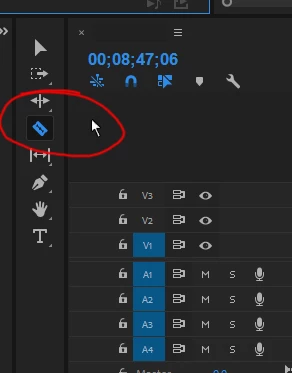
 AdChoices