



Mouse Lag + Timeline PlayHead Lag with new Update
Hey guys just wanted to post to help anyone who is having mouse lag + playhead timeline lag/freezing + just lag in general with the new update to Premiere/windows 11 update. My mouse was super laggy when not even in a project and just in the preference settings and bad lag when playing in the timeline and the playhead just stopping but the video playing normal.
Things I tried:
Set Audio Hardware input to: no input
Disabled mouse acceleration (Enhance pointer precision)
Clear Media Cache
Resetting workspace layout
Update Nvidea Drivers/reinstall
unistall and reinstall Premiere Pro
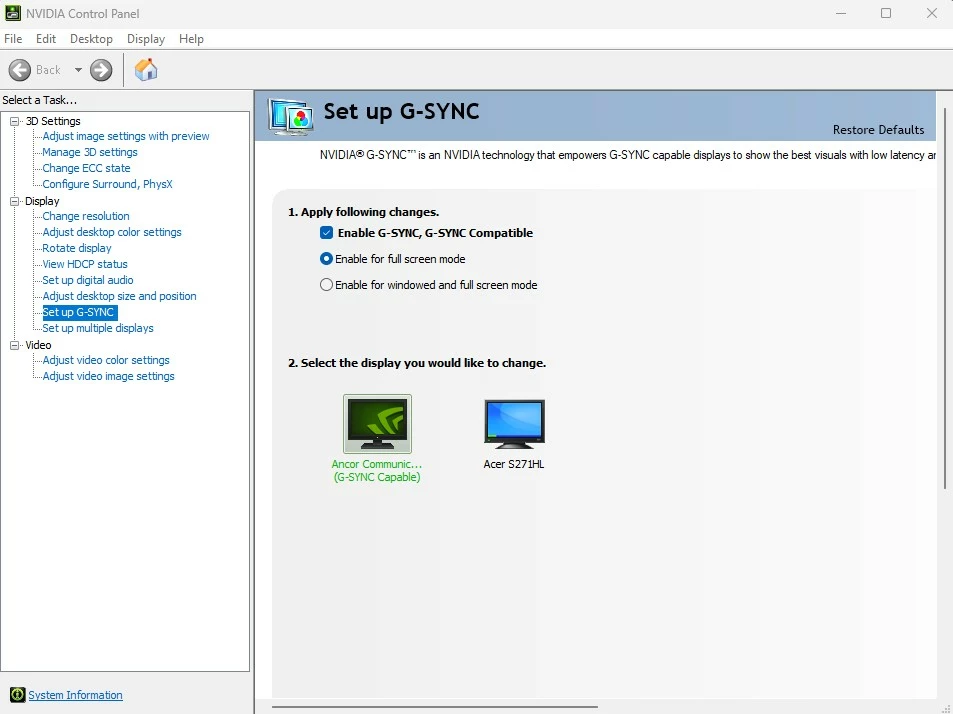
and finally what did it for me was checking enable Gsync for full screen mode only and not for windowed mode and fullscreen in the nvidea control panel.
Should look like this photo below
Hope this helps
 AdChoices