
Participant
April 26, 2018
Answered

MOV file not

  • April 26, 2018
  • 5 replies
  • 1779 views

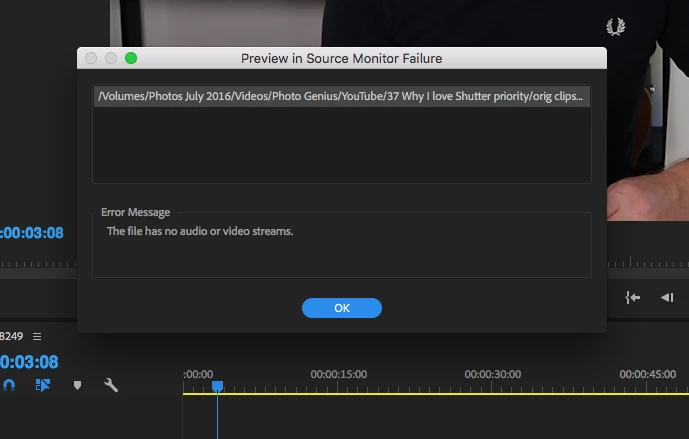
When trying to open or preview an MOV file (created in After Effects) this is what happens.

I'm using Premiere Pro CC 12.1.1 (latest update) and I've previously had no issues importing the same MOV file into Premiere.


Any suggestions welcome.

Thanks in advance
    This topic has been closed for replies.
    Correct answer Kevin-Monahan

    Hi Paul Farris,

    It's likely this situation: Dropped support for QuickTime 7 era formats and codecs

    Thanks,
    Kevin

    5 replies

    Participant
    October 9, 2024

    Help me

    Participating Frequently
    August 30, 2018

    Hi,

    This will fix your problem.

    This easily converts .mov files to a codec that can be imported in to the current Premier Pro. I just tried it and it works. It's for Camtasia but works the same for Premier Pro   https://www.learncamtasia.com/cool-resources/convert-alpha-movs-to-work-in-camtasia-9/

    Just follow the 5 min video and download the files below it.

    I can now import all my older .mov alpha channel videos and they work as they should do.

    Kevin-Monahan
    Community Manager
    Kevin-MonahanCommunity ManagerCorrect answer
    Community Manager
    May 26, 2018

    Hi Paul Farris,

    It's likely this situation: Dropped support for QuickTime 7 era formats and codecs

    Thanks,
    Kevin

    Kevin Monahan - Sr. Community & Engagement Strategist – Pro Video and Audio
    Zoe7traveller
    Inspiring
    September 23, 2018

    Same problem here -- but it is insane that I need another video editor (which I have) Camtasia to convert a file to use in Premiere which i'm paying lots of money for to be my primary video editor.

    SMH

    Vidya Sagar
    Adobe Employee
    Adobe Employee
    May 10, 2018

    Hi PaulFarris, TristyDee,

    Sorry for the trouble. It could be an issue with the old media cache. Please clear the cache & check.

    Here are the steps: FAQ: How to clean media cache files?

    Let us know the status.

    Thanks,

    Vidya

    Participant
    April 26, 2018

    I'm experiencing the same thing. Certain mp4's and mov files are coming back with the same "media offline" message. When i try to reconnect the media, I get an error message that says that the two files don't match up and therefore the file will be deleted from the project and from any sequence that it's in. When I press OK or go back in the bin and delete it manually, I usually try to re-import it. When I try to bring the video file back into Premiere, it comes in as an audio file as if the video doesn't exist. Also with certain of my Apple ProRes files, the audio glitches.