ibracadabra224
Participant
April 12, 2019
Answered

MP3 importing issues

  • April 12, 2019
  • 1 reply
  • 11499 views

Hi everyone,

I am working on a project but I am having issues importing a mp3 file in my timeline. I don't know for what reason my file is 29 seconds but when I drag it inside the project I actually miss at least 2 seconds which cut the sentence  and make my audio useless. Does anyone know how to fix this issue or why is this happening?

thanks everyone for your help

    This topic has been closed for replies.
    Correct answer rodneyb56060189

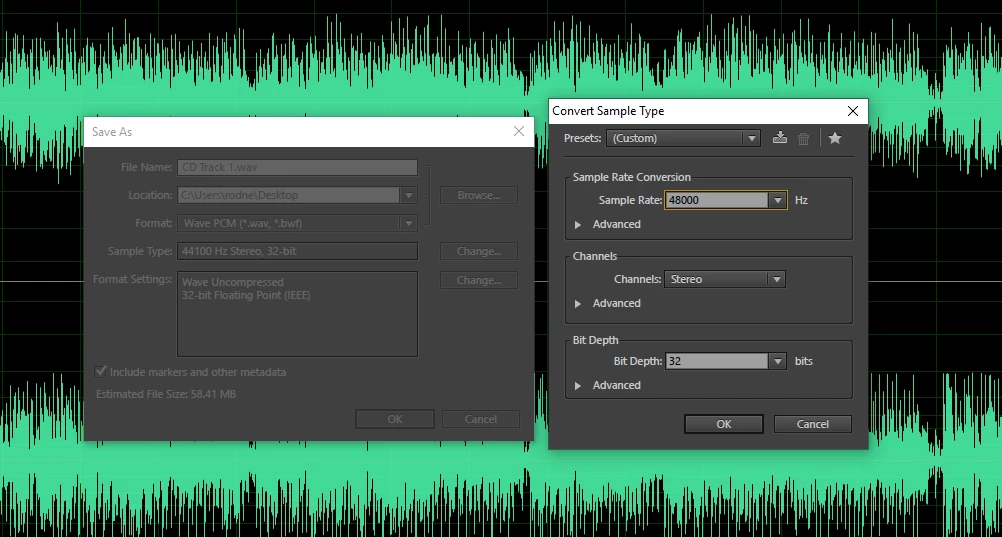
    As Vidya suggested....convert to wav in audition. open the mp3 in audition, select 'save as', choose wav format, make it something like what you see below … if it is a stereo file … if mono you can choose that too.

    is fast and easy and is best sound file to use in all your editing ( either wav or broadcast wav is best for editing ).

    If you have other sound files ( like from smart phones, etc. ) you can do the same thing...convert to wav.

    1 reply

    Vidya Sagar
    Adobe Employee
    Adobe Employee
    April 12, 2019

    We’re so sorry to hear about the import issue, ibracadabra224. MP3 is a highly compressed file format and can give issues. 

    Convert the file into WAV, import it and check if the issue persists.

    What is the source of the MP3 file? Please check if it is happening with all MP3 files.

    Thanks,

    Vidya

    rodneyb56060189Correct answer
    Legend
    April 12, 2019

    As Vidya suggested....convert to wav in audition. open the mp3 in audition, select 'save as', choose wav format, make it something like what you see below … if it is a stereo file … if mono you can choose that too.

    is fast and easy and is best sound file to use in all your editing ( either wav or broadcast wav is best for editing ).

    If you have other sound files ( like from smart phones, etc. ) you can do the same thing...convert to wav.

    Legend
    April 12, 2019

    P.S. I use CS6 so menu might look slightly different than what you use, but the gist is the same.