

ski resorts video
Known Participant
August 5, 2024
質問

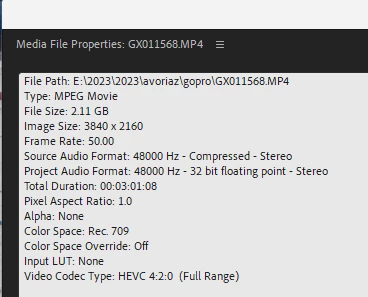
mp4 (from go pro 8) files plays choppy in premiere pro(video and audio)

  • August 5, 2024
  • 返信数 6.
  • 565 ビュー

I have the latest version of premiere pro.
mp4 (from go pro 😎 files plays choppy in premiere pro (video and audio). 
gpu drivers are updated. how can i solve it?
all the files have the same problem.
 here are the file properties.
here's is a video of the file in premiere source monitor:


このトピックへの返信は締め切られました。

返信数 6

ski resorts video
Known Participant
August 29, 2024

An update: restart does help, but after a while, the problem returns. There are no problems in other video players.
 there is enough space on all discs.  Here  is my system info and my display info:
I hope someone can help

ski resorts video
Known Participant
August 5, 2024

thanks for all the help.  I made a rookie mistake and didn't restart the computer before trying other solutions.
 restarting my computer fixed it!

Peru Bob
Community Expert
Community Expert
August 5, 2024

Check the Audio Hardware Preferences. Default Audio Input should be set to No Input.

Known Participant
August 5, 2024

What is the footage like when it's exported?


ski resorts video
Known Participant
August 5, 2024

it is smooth when I export it.
BTW the raw footage is smooth playing in insta 360 for example.
what could be the problem in premiere? i deleted  media cache files

Known Participant
August 5, 2024

a few basic ideas to try would be to do a full render of the footage when it's in the timeline... Sequence > Render effects in to out. 


Another trick would be making sure the footage is stored on your actualy device you're editing from rather than an external hard drive etc. 


If the export is okay, it may simply be that your computer cannot handle the speed of file

kglad
Community Expert
Community Expert
August 5, 2024

in the future, to find the best place to post your message, use the list here, https://community.adobe.com/

p.s. i don't think the adobe website, and forums in particular, are easy to navigate, so don't spend a lot of time searching that forum list. do your best and we'll move the post (like this one has already been moved) if it helps you get responses.


<"moved from cc desktop bugs">
ski resorts video
Known Participant
August 5, 2024

thanks

ski resorts video
Known Participant
August 5, 2024

 I now realized that it is happening with all kinds of footage. what is wrong with premiere?