Inspiring
April 16, 2022
Answered

MP4 imports from Zoom only audio loads on timeline

  • April 16, 2022
  • 1 reply
  • 226 views

I am taking recordings made on Zoom and bringing them into Premier Pro to edit. Sometimes I will drag and drop the MP4 file directly from the download from Zoom onto the timeline with no problem. But many times I will only get the audio part.  I can't tell the difference. What should I be doing?  [sorry for such a basic question].\I am using the latest  version of Premier Pro on a Microsoft PC.  
This topic has been closed for replies.
Correct answer Ann Bens

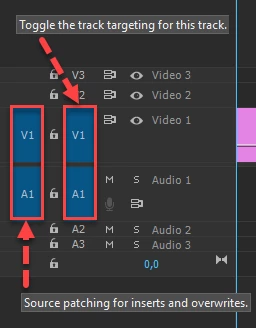
The most common user error is not source patching the track.
Solved by first opening clip in Source Monitor. Then drag/insert into timeline.

1 reply

Ann Bens
Community Expert
Ann BensCommunity ExpertCorrect answer
Community Expert
April 16, 2022

The most common user error is not source patching the track.
Solved by first opening clip in Source Monitor. Then drag/insert into timeline.

braidladyAuthor
Inspiring
April 16, 2022

Thanks! I was definitely being sloppy with my imports and channel selection.  Yep, definitely a soucrce pathcing error. Appreciate the reply and leading me to an easy and quick fix. All is working now.