
.mp4, sound but no vidéo
Hi,
I've got PremierProCC.
Here's my problem :
When I import a first vidéo and drag and drop it into my assembly line, my video become a new sequence and I can start to work on it. Fine.
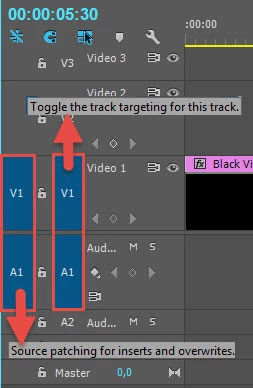
But then, when I drag and drop my second vidéo (.mp4 all of them), I can only drop the sound of it, the image disappear, my pointer become a Ø when I fly over the "vidéo" line on my sequence.
So I tried something else, I imported my videos but before to drag and drop them on my assembly line, I created a sequence. Then I dragged and dropped my video into it. On this senario, I can't see any sound at all.
Basically, as soon as I have a sequence created, the assembly line accept only the sound of my video.
I checked on Google, on forums, for some answers, and the main feedback was "not enough volatile memory".
Does anyone could help me with this ?
Thanks a lot in advance
JJ
 AdChoices