Known Participant
March 23, 2025
Answered

Multi camera workflow

  • March 23, 2025
  • 2 replies
  • 382 views

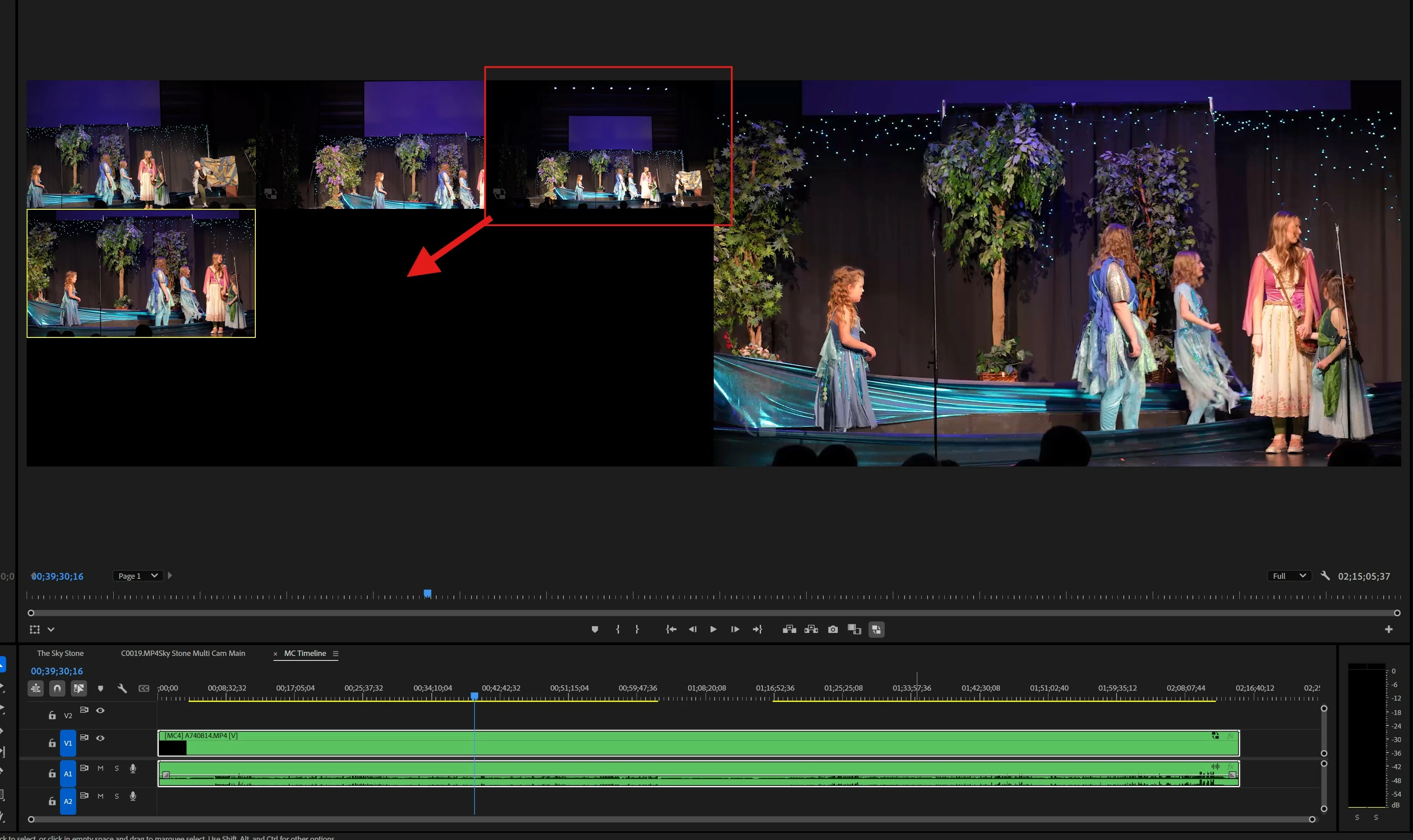
Quick question for you Multi Camera experts out there. Is there a way to change the view so the 4 cameras are stacked with two cameras in each row instead of three cameras in one row and a fourth camera in a new row? I am posting an example in case I am not doing a good job of describing this, 
 

Correct answer Mike Dziennik

It's possible your multi-cam sequence actually contains more than 4 'cams'. Perhaps due to your audio.

Load your multicam clip into the source monitor and using the wrench button: choose Edit Cameras. Disable any you don't need.

2 replies

Community Expert
March 23, 2025

As Mike said, just go to your multicam sequence and delete empty video tracks...

Mike Dziennik
Community Expert
Mike DziennikCommunity ExpertCorrect answer
Community Expert
March 23, 2025

It's possible your multi-cam sequence actually contains more than 4 'cams'. Perhaps due to your audio.

Load your multicam clip into the source monitor and using the wrench button: choose Edit Cameras. Disable any you don't need.

Known Participant
March 24, 2025

Thank You