jaredw51492744
Participant
April 26, 2019
Answered

Multi Video on one screen, Dip to black applies to all clips in timeline - why?

  • April 26, 2019
  • 2 replies
  • 9799 views

Hello,

i'm putting together a video of some scuba footage and putting multiple videos on the screen at once.  I want them each to slowly fade in from black and fade out to black at different speeds and times, bringing new videos in for each spot here and there.  I'm using dip to black to do this.  My problem is - ALL videos are being impacted by the fade to black i apply to a specific video.

in the picture below you see video V5 which corresponds to the mid right video.  You see that it is fading to black and the video above it has faded to black.  This is happening because of the dip to black effect i have on V6, the top right video.

is this working as intended?  is there anything i can do to change this and get the desired outcome?  I'm hoping i don't have to just do opacity keyframes instead.
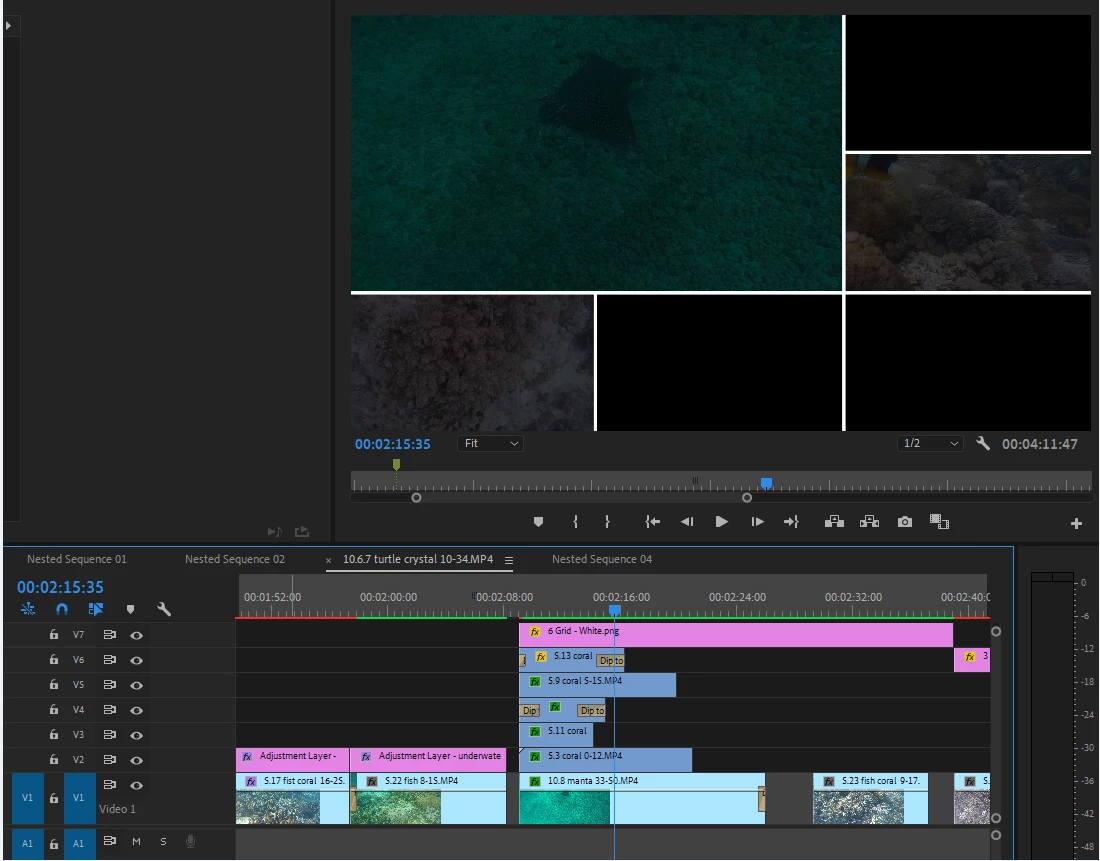
thanks folks!

    This topic has been closed for replies.
    Correct answer Richard M Knight

    Try using a cross dissolve instead of the dip to black

    2 replies

    Ann Bens
    Community Expert
    Community Expert
    April 26, 2019

    Dip to black does what it says, makes the clip black not fade out (transparent)

    On a side note:

    Dip to black is more of a double sided transition, not suited for single sided clips.

    Follow Richards advice.

    jaredw51492744
    Participant
    April 26, 2019

    Correct me if i'm wrong but Dip to Black is an EFFECT.  I apply an EFFECT to a specific clip.  If i wanted to apply an effect to multiple clips (either stacked on top of each other, or one after another in the timeline) then i'd make an adjustment layer and put it over everything.

    so why does applying dip to black put the effect on the clip to which it is attached AS WELL AS the clips below it (v1, V2, V3, etc)  - it's not attached to those clips

    Ann Bens
    Community Expert
    Community Expert
    April 26, 2019

    Dip to black is not an effect but a TRANSITION

    Transitions are either single sided or double sided.

    Applying transitions in Premiere Pro - handles

    Might want to read my post 2 again which explains what dip to black does.

    Set your Program Monitor to Transparancy Grid then you will see what is going on.

    Richard M KnightCommunity ExpertCorrect answer
    Community Expert
    April 26, 2019

    Try using a cross dissolve instead of the dip to black