Participant
November 19, 2019
Question

Multicam Sequence Problem

  • November 19, 2019
  • 1 reply
  • 461 views

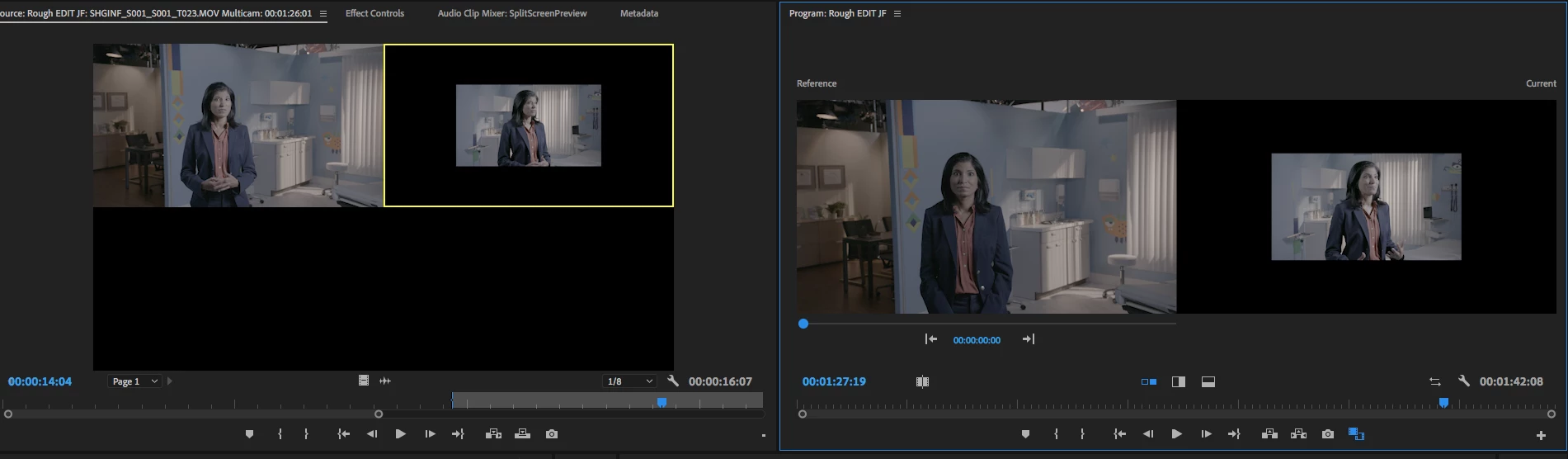
Using Premier Pro - Creating multicam sequences with 2, 4K cameras, my second camera isnt filling the screen.  This works correctly some time but not others.  See attached, thanks.

This topic has been closed for replies.

1 reply

Warren Heaton
Community Expert
Community Expert
November 19, 2019

Your Sequence Preset is probably set to "Automatic" when you create your Multi-Camera Source Sequence.


Do you want to be working at 2160 or 1080?


If you want to be working at 2160, you'll probably want to upconvert your 1080 footage to 2160.  While you can use Scale to Frame Size or Set to Frame Size in the Timeline for the Multi-Camera Source Seqeunce, you may want to take advanage of Detail-Preserving Upscale in After Effects or purchase Red Giant Instant 4K for use in Premiee Pro.


If you want ot work at 1080, you'll probably want to downcovert your 2160 footage to 1080.  You can use Scale to Frame Size or Set to Frame Size.  Right-click the Multi-Camera Source Seqeunce in the Project tab and choose Open Timeline.  Then right click the 2160 clips and choose Scale to Frame Size (leaves the Scale paramter at 100% while fitting the picture ot the Sequence frame size) or Set to Frame Size (changes the Scale parameter to 50% to fit the picture to the Seqeucne frame size).  You could also opt to crop the 2160 clips to 1080, allowing for reframing without losing resolution.


Harold Silva
Community Expert
Community Expert
November 19, 2019

Try to use Scale to frame size.

Harold Silva B.