


January 2, 2026
Answered

Multicamera not showing

  • January 2, 2026
  • 2 replies
  • 557 views

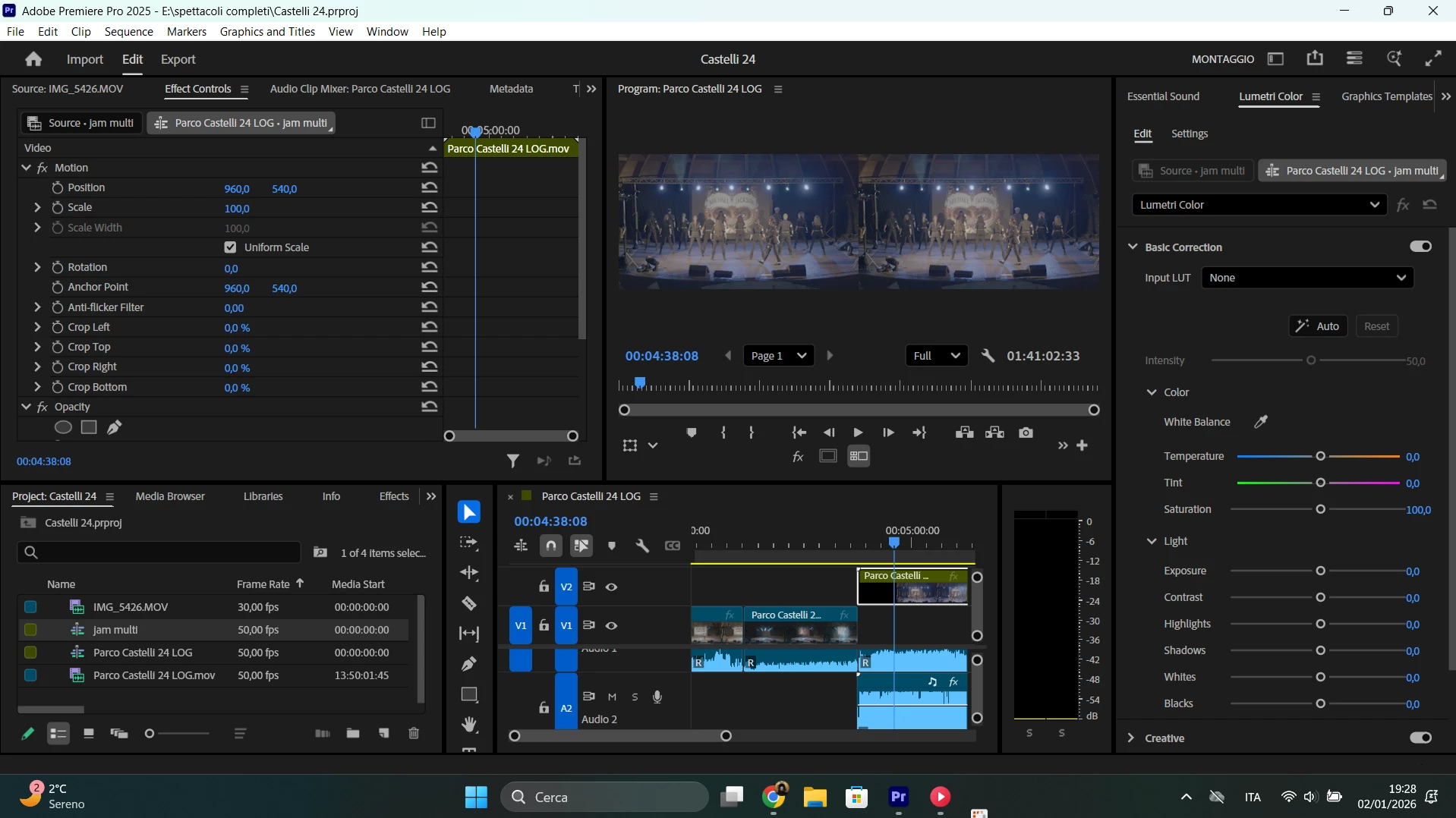
After following the same steps many YouTube videos show, my multicam sequence will just show two times the same image (I already tried to toggle the V1, V2 etc. layers, moved the layers themselfes, my display is set to multi-camera, multi-camera is enabled...). I used to work with multicam very easely in the past and lately I'm facing this problem.

Can someone pinpoit a problem here?
 

872514i6FB57685AAFA402B.png

Correct answer PaulMurphy

If you select only the V2 video target (to the right of the lock icon), the Multi-Camera view should display all angles as expected.

When more than one video track is targeted, the Multi-Camera view will display angles from the lowest targeted track by default. To change this behavior, click the Settings (wrench) icon in the Program Monitor and enable Multi-Camera Selection Top Down.


When working with multicamera edits, it’s best to:

  • Keep all your multicamera source sequences on the same video track
  • Or ensure that only the video track containing the multicamera source sequence is targeted

2 replies

PaulMurphyCommunity ExpertCorrect answer
Community Expert
January 2, 2026

If you select only the V2 video target (to the right of the lock icon), the Multi-Camera view should display all angles as expected.

When more than one video track is targeted, the Multi-Camera view will display angles from the lowest targeted track by default. To change this behavior, click the Settings (wrench) icon in the Program Monitor and enable Multi-Camera Selection Top Down.


When working with multicamera edits, it’s best to:

  • Keep all your multicamera source sequences on the same video track
  • Or ensure that only the video track containing the multicamera source sequence is targeted
January 6, 2026

Thank You!

R Neil Haugen
Legend
January 2, 2026

You selected both video clips in making the multicam, right? And both have audio?

Everyone's mileage always varies ...
January 6, 2026

I have selected both, but i unlinked the audio because I plan to work on it later. Is that the problem?