Inspiring
August 19, 2023
Answered

Multicamera playback looks terrible and nearly impossible to use

  • August 19, 2023
  • 5 replies
  • 395 views

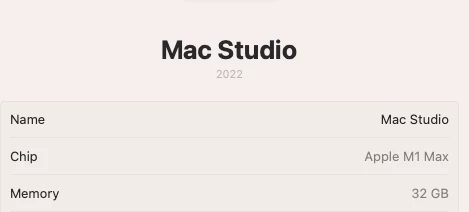
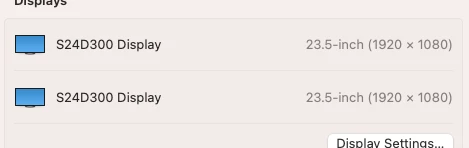
The quality of multicamera playback  4k from iphones and camera, whether 2 cameras grouped or 4 cameras grouped is so bad that it is almost an unusable feature. I have searched uncle google over and over for any remarks about this and have found none. Is there a setting for multicamera sequence which does not reduce the resolution as much as it does? Please answer this query but know that my system specs and versions of software are here.

This topic has been closed for replies.
Correct answer someTV

I figured it out. The playback in full screen or enable transmit is dependent on the size of the program or source monitor panel. If it is very small, then the transmit mimics the look of very compressed resolution as it is seen in the source or program monitor. So playback is dependent on the size of the panel. If I want very small source and program monitors on my left display and full screen on my right, the full screen will be grotty (trying to create real estate for my timeline). The workaround is to tilde my timeline large, but then I lose the program and source monitors. All this to say, the last few years on media composer software only I have had three monitors where the center one was devoted to the timeline, and maybe I need to get a third monitor for this premiere situation. Thanks for responding.

5 replies

MyerPj
Community Expert
Community Expert
August 19, 2023

Glad you got it! 🙂

someTVAuthorCorrect answer
Inspiring
August 19, 2023

I figured it out. The playback in full screen or enable transmit is dependent on the size of the program or source monitor panel. If it is very small, then the transmit mimics the look of very compressed resolution as it is seen in the source or program monitor. So playback is dependent on the size of the panel. If I want very small source and program monitors on my left display and full screen on my right, the full screen will be grotty (trying to create real estate for my timeline). The workaround is to tilde my timeline large, but then I lose the program and source monitors. All this to say, the last few years on media composer software only I have had three monitors where the center one was devoted to the timeline, and maybe I need to get a third monitor for this premiere situation. Thanks for responding.

MyerPj
Community Expert
Community Expert
August 19, 2023

That is pretty odd looking. If it were a PC, i'd suggest updating your video driver. I'm not sure what the mac equivalent would be. Also, what's the footage. Are you sure it's the size you are suggesting? Try other clips too... see if they are giving similar results, or is it only frmo the footage from that day?

someTVAuthor
Inspiring
August 19, 2023

adding link to video of grotty playback https://vimeo.com/855896699?share=copy

someTVAuthor
Inspiring
August 19, 2023

adding screen grab of playback