
March 3, 2020
Question

Multiple colors keying

  • March 3, 2020
  • 2 replies
  • 3699 views

Hi,

I'm pretty new here, i had a look around and i can't seem to find the solution to my problem.. although it seems logically not impossible (excuse my bad english 🙂 ).

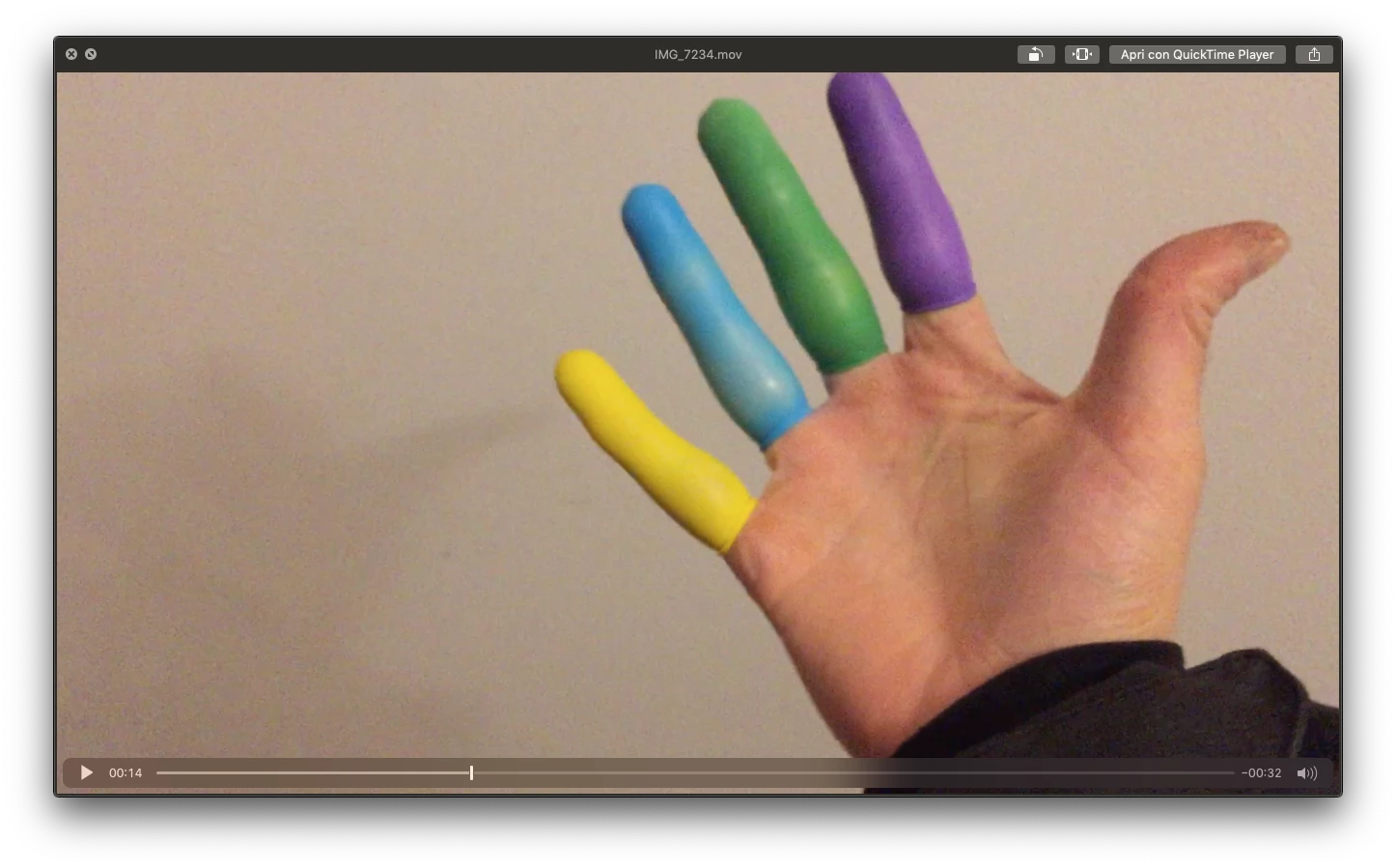
So my aim is to key out different colors in a video i shot and replace them with different images/video (have a look at the frame of the video down here)... the half-solution i found was to key out a color (just like you do for a normal green screen), NEST the scene and proceed to keying out another color, NEST the scene and so on.. the main problem is that the second-third-fourth keying will effect also the all the previous SUBSTITUTED colors/scenes, this way i'm allowed to put, say, into the pinky only yellow images, in the ring finger only blue images etc... otherwise the keying screws up everything... I hope that's understandable!


The only way around it i can think of, is to find a blend mode that's kind of "TRANSPARENCY TO COLOR" (if such a thing exists) and put the layers ON TOP of the main scene and make each one fo them "VISIBLE only to a certain color" of the background (which would be the main scene)... 

I'm really going with the logic here.. i hope my question is understandable and i hope the solution exists! 


thanks again

Massimo 

:
2 replies

Richard van den Boogaard
Community Expert
Community Expert
March 4, 2020

Please try to isolate each finger in a separate layer using masks; then apply the effect to that specific layer and put it all together in a final layer super-imposing the seperate layers + the original layer at the bottom.


Hope this helps.

chusbaker
Participating Frequently
March 3, 2020

Hi Massimo Tortella,

I think your idea will not work, to be able to key a color you need to have one tone of a color and you have many tones, from clear almost white to a dark tone of each color so the key will not work well anyway.

Best of luck


March 3, 2020

Hi, thanks for replying, I know it won't work well with this kind of color, light and quality probably as well.. but it's really a lo-fi effect i'm looking for so i don't mind glitches and "errors".. i'm just interested on how you would do it.


Isn't there like a "show on a X color of the background" blend mode/effect?


thanks

M


chusbaker
Participating Frequently
March 3, 2020

Hi, the effects to apply depends on what type of animation you are trying to achieve. Are the coloured fingers moving? Are the images that will be inserted moving, you have to reframe them? In general you would think of masking out to a layer where you will show the replacement video/image. To do that you can use a combination of tools, keying being one of them but in this case might not be the best option since you have 4 diferent colours.

Best of luck