
LuMags
Inspiring
May 8, 2022
Question

MXF Audio not playing in Premiere - Sony FX7

  • May 8, 2022
  • 3 replies
  • 3026 views

HELP: Sony FX7 and MXF question:
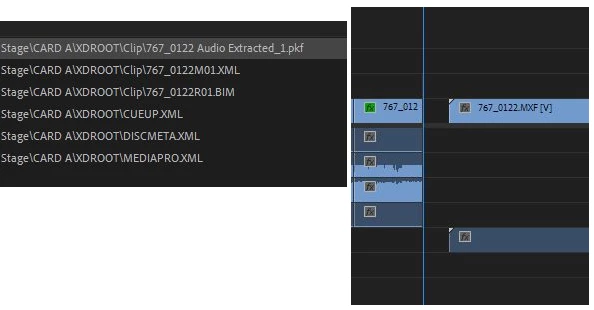
I filmed a show last weekend and I can't work out what I did differently in Premiere with the first half video clip and the 2nd to get the sound channels to split like the picture.

Left hand 0121 is the 1st half -super, smashing great, the right 0122 clip is the 2nd half.

How the Jiminy Crickett do I get the 4 channels out of the 2nd half as I did the first?!?!
 

This topic has been closed for replies.

3 replies

Franz Diwischek
Participating Frequently
October 28, 2022

MXF files with 8 audio channels cause exactly the same problem for me after importing them into Premiere Pro.
The audio channels of the first clip are always corrupt and cannot be split properly.
Even when one SD card gets full and another is written to, the audio problem is present on the first clip. The second clip and the remaining clips on the card then work again as they should. For professionals, this is actually unacceptable.

LuMags
LuMagsAuthor
Inspiring
May 9, 2022

POSSIBLE SOLUTION:

Hi, I called up Adobe tech support, dude said to download the Beta for Prem Pro so I did. Initially the behaviour was the same. Then I removed the footage/source from Media Browser, re-imported it. Dragged it in to existing healthy seq, no change. However I then did Create New Sequence from clip, all 4 channels are available. Cut+Paste into healthy seq now all fine. 

Dude on the phone said that Sony MXF files are known to be problematic with video not the right colour or the audio to be hit + miss as with mine. But now I'm ok so thought I'd feed this back to the Community and hope it helps someone else in the future.

Cheers to adobe Tech Support for the assist!

Peace!

Community Expert
May 8, 2022

Did you import the clips using the Media Browser?

LuMags
LuMagsAuthor
Inspiring
May 8, 2022

Good morning,

Yes I imported the entire card of the XQD I copied to my D drive via Media Browser. Not sure how else you'd get footage into Premiere! 

Community Expert
May 8, 2022

Right click on the files in the project panel and select Modify-Audio Channels, Post a screen shot of both the good and bad file so we can see how they differ. If they look the same, use the program MediaInfo in tree view to see how the files differ.