
Participating Frequently
July 13, 2022
Pregunta

My 1920 x 1080 Go Pro footage becomes blurry after export

  • July 13, 2022
  • 1 respuesta
  • 1365 visualizaciones

I have searched and searched and tried so many different export settings, I'm not sure what to try next.


My Go Pro is recording video of the kids behind the boat, and saves as a .MP4 file so I don't believe a converter is needed?  After exporting from Premiere Pro CC it looks "blurry".  I believe I had this issue a couple years ago, but for the life of me, I can't remember what settings solved the problem.


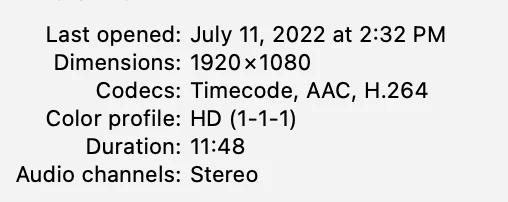
I've tried many different presets and settings, so I don't think a screen shot will help.  I've attached info from the raw file, if anyone has the settings I need or can send me a preset I would sure appreciate the help.


Thanks
 

Este tema ha sido cerrado para respuestas.

1 respuesta

R Neil Haugen
Legend
July 13, 2022

So for needed details, please include the seqeunce settings for framesize/rate, as well as the export settings for framesize/rate.


Neil

Everyone's mileage always varies ...
Participating Frequently
July 14, 2022

Thanks for replying.  I can't really give the export settings as I've tried so many, I'm just trying to find the correct ones.  I'm wanting to keep the 1080 quality for upload to Vimeo.  


When I choose Match Source, this is what I get.  I'm wondering if the frame rate is too high.


Jeff Bellune
Legend
July 14, 2022

Please post a screenshot of the tree view or the text view of MediaInfo for the GoPro source footage. Then please post a screenshot of your sequence settings.