Participant
April 11, 2018
Question

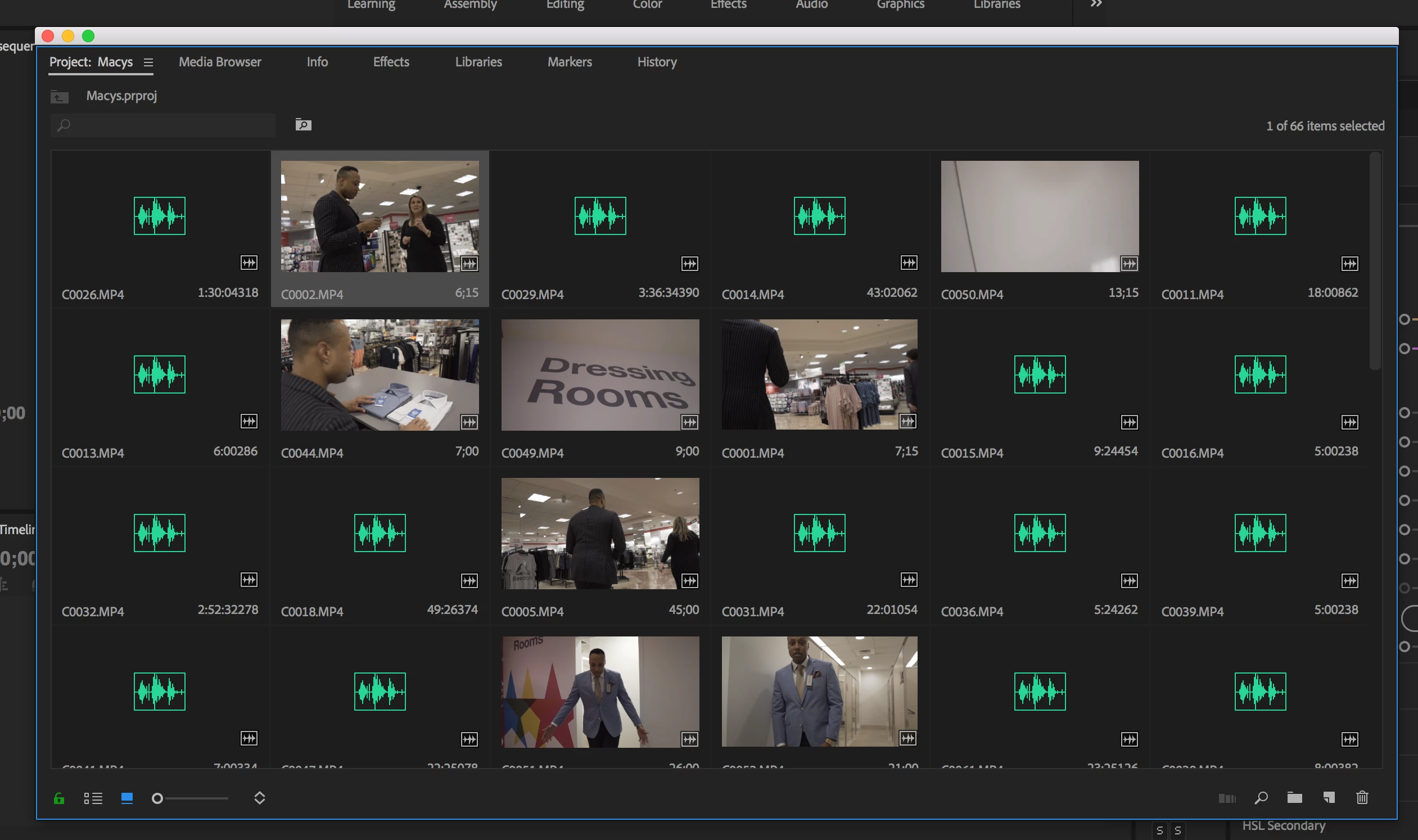
My MP4 files are importing as audio only, please help.

  • April 11, 2018
  • 7 replies
  • 5909 views

Hello I'm experiencing difficulties importing my mp4 files from my sony a6300.

This has never been an issue in the past, today premiere pro decided that my mp4's have no video content and just appear as an audio file.

There are a select few that imported just fine but a mass majority of them are problematic.

Please let me know if you have a solution to this problem, thank you!
This topic has been closed for replies.

7 replies

Participating Frequently
December 17, 2018
Participant
August 26, 2018

juanmario  just posted this in another thread and it worked for me after trying everything in this thread and the below:

https://forums.adobe.com/thread/2486467

https://helpx.adobe.com/uk/premiere-pro/kb/premiere-pro-imports-audio-only.html

DO THIS:

Go to Edit> Preferences> Media and remove the checkbox before the item: enable Intel h.264 decoding (requires restart), on (12.1.2) Enable hardware accelerated decoding.

I have 12.1.1 (can't get 12.1.2 yet) and the above is labelled 'enable _accelerated_ h.264 decoding (requires restart)' there but it worked (do restart)

One thing to note is that I tried importing 15 clips together and it crashed, so I did them one by one and it worked fine.

Kevin-Monahan
Community Manager
Community Manager
May 16, 2018

kevin.sales,

Are you clear of this issue yet? Let us know.

Thanks,

Kevin

Kevin Monahan - Sr. Community & Engagement Strategist – Pro Video and Audio
Vito Marchini Machristi
Participant
July 5, 2018

Hellow kevin,

ever since i´ve updated the software i had problems with importing mp4 files; they import only as audio files.
I have tried all the suggestions from above and nothing works.
Help urgently, I have an important deadline soon.

Jeff Bugbee
Community Expert
Community Expert
July 5, 2018

Are you importing natively or using the Media Browser?

jessyh62162730
Participant
May 4, 2018

hi, i've got the same problem... I tried all the solutions written by Jim_Simon but i can't find a solution. Any idea please ? thx !

second view for media explorer.

i use a sony Mark III

jessyh62162730
Participant
May 4, 2018

i did a duplication of the files in the folder and it works... i took the copy

Known Participant
May 4, 2018

just saw this, yes seemed to fix issue for me too, why?

masku2000
Adobe Employee
Adobe Employee
April 18, 2018

Can you post or direct-message me a link to download one of the problem files, and we'll take a look.

Participant
April 18, 2018

hi this problem occured to us with the current media files supplied on the adobe web site . Half import with sound, half import as sound only. All play in all other apps. Best matthew

Participant
April 18, 2018

In addition There appears to be an issue with the search function after import. Best matthew

luizs37748932
Participant
April 16, 2018

I'am having this same problem, did you found a solution?

Legend
April 11, 2018

Start with Step 2h below.  If that doesn't work, try Step 2i.

Unofficial Premiere Pro Troubleshooting Guide