Answered
My premiere Pro keeps auto scaling
Hello!

Hello!
My program keeps automatically adjusting my video so that no matter what scale it is on, the video will slowly correct to the next video.
By @Cyd2878336486f
It seems that you have two more keyframes to the left that creates this.The keyframe "disappears" if you first set the keyframes on a clip that let´s say is 10 seconds and then trim the clip to anything shorter. So if you set the keyframe/s at 10 seconds they are there, but if you trim outgoing side of the clip to 9 seconds you wont no longer see the keyframe/s, but they are still there and will continue to do their thing.
If you move the clip to a free higher track and trim out the outgoing clip you will find them. (outgoing clip=trim the left side of the clip)
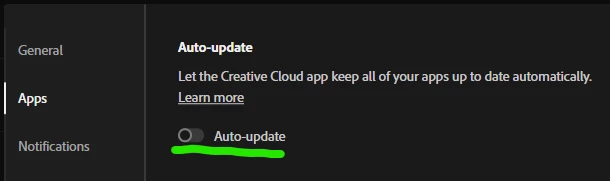
Regarding the auto-update: Launch the Creative Cloud app and go to it´s Preferences and turn it off.
Already have an account? Login
Enter your E-mail address. We'll send you an e-mail with instructions to reset your password.


 AdChoices