noahh06
Participant
February 2, 2026
Answered

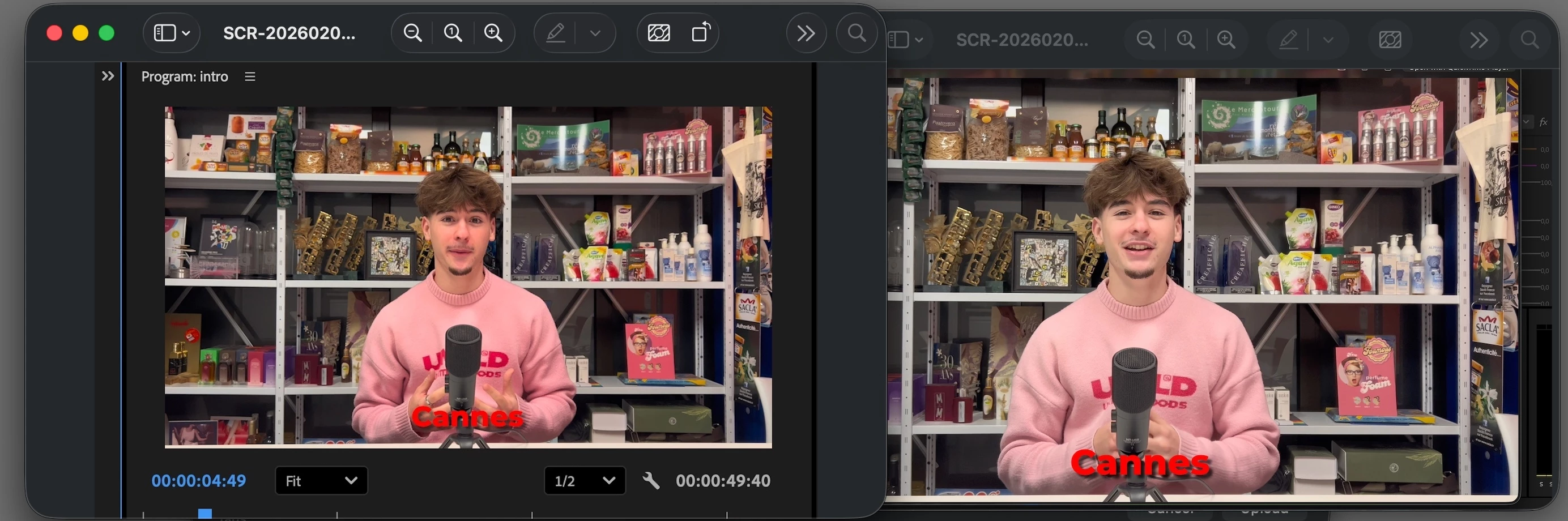
My preview doesn’t match the final render. The footage is from an iPhone, and despite following tutorials, the rendered files look different. Any idea why or how to fix this?

  • February 2, 2026
  • 3 replies
  • 73 views

I set the project to REC709 as suggested, which helped a bit but the image still looks different and flat. I tried adjsuting Lumetri changing codecs, exporting via Media encoder and rendering in another software


    Correct answer R Neil Haugen

    How are you determining the problem? By viewing the export in QuickTime player on a Mac, it seems? Try viewing it in VLC or Potplayer, which will probably show an image similar to Premiere’s view. Because the issue is being caused by the Apple Colorsync color management utility. 


    QuickTime Player allows Colorsync to set CM, and VLC and Potplayer normally do not allow Colorsync to set CM.


    I work for/with/teach pro colorists, most of whom are Mac geeks. And this is an Apple caused problem that drives them nuts, and has for years.

    Are you aware that QuickTime player does not use the correct display transform for Rec.709 video? The standards have required a display transform including an (essentially) gamma 2.4 ‘curve’ as a normal matter of course. But Apple for some unknown reason chose to apply a display transform gamma of essentially 1.96. (They also don’t totally stick the landing on the mapping of color data to the P3 space of the monitors ...)


    Note: on Mac computers, that have Reference modes, when the Reference mode is set to HDTV, those computers will then use the correct display transform gamma!


    So ... all broadcast compliant systems, most TVs, most Androids and regular computer monitors will normally apply a gamma 2.4 transform ... as will the above mentioned Macs with Reference modes set to HDTV.


    The only systems using that gamma 1.96 display transform for Rec.709 video are Macs that do not have Reference modes set to HDTV.


    So you have a choice. IF you set the viewer gamma in Premiere to gamma 1.96, and then do your color corrections, the changes you make will result in a file export that in QuickTime player on your Mac will be similar to what you saw in Premiere.


    However! Understand that the file you have exported will now be way too dark and oversaturated on all Macs with HDTV settings and all other devices out there.

    3 replies

    MyerPj
    Community Expert
    Community Expert
    February 3, 2026

    Also, take a look at the export inside Premiere. Import it in, and compare it to the timeline version.

    R Neil Haugen
    R Neil HaugenCorrect answer
    Legend
    February 3, 2026

    How are you determining the problem? By viewing the export in QuickTime player on a Mac, it seems? Try viewing it in VLC or Potplayer, which will probably show an image similar to Premiere’s view. Because the issue is being caused by the Apple Colorsync color management utility. 


    QuickTime Player allows Colorsync to set CM, and VLC and Potplayer normally do not allow Colorsync to set CM.


    I work for/with/teach pro colorists, most of whom are Mac geeks. And this is an Apple caused problem that drives them nuts, and has for years.

    Are you aware that QuickTime player does not use the correct display transform for Rec.709 video? The standards have required a display transform including an (essentially) gamma 2.4 ‘curve’ as a normal matter of course. But Apple for some unknown reason chose to apply a display transform gamma of essentially 1.96. (They also don’t totally stick the landing on the mapping of color data to the P3 space of the monitors ...)


    Note: on Mac computers, that have Reference modes, when the Reference mode is set to HDTV, those computers will then use the correct display transform gamma!


    So ... all broadcast compliant systems, most TVs, most Androids and regular computer monitors will normally apply a gamma 2.4 transform ... as will the above mentioned Macs with Reference modes set to HDTV.


    The only systems using that gamma 1.96 display transform for Rec.709 video are Macs that do not have Reference modes set to HDTV.


    So you have a choice. IF you set the viewer gamma in Premiere to gamma 1.96, and then do your color corrections, the changes you make will result in a file export that in QuickTime player on your Mac will be similar to what you saw in Premiere.


    However! Understand that the file you have exported will now be way too dark and oversaturated on all Macs with HDTV settings and all other devices out there.
    Everyone's mileage always varies ...
    Community Expert
    February 3, 2026