
GWR71
Inspiring
April 4, 2024
Question

My project suddenly associated itself with PPro Beta, which I don't use?

  • April 4, 2024
  • 3 replies
  • 491 views

I came back to my current PPro project after only a couple of hours, and suddenly it wouldn't open.  If  tried to open it, I got the following dialogue box:
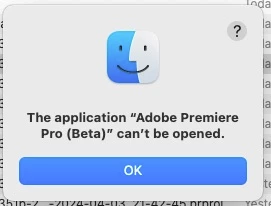


Thing is, I don't use Beta. It's not installed on my machine. I noted that the .prproj file for my project, and all the incremental files in the auto-save folder, just had the "blank document" icon, showing that they weren't associated with any installed app at the moment.


I right-clicked on the project and chose "Open with", and boom, for some unknown reason Premiere Pro Beta, which just to reiterate is not installed, was listed as the default app to open it with. I chose Premiere Pro and it opened normally.


Any reason why it would have done this?


This is on macOS 13.6.6, PPro 24.3.0.

This topic has been closed for replies.

3 replies

Kevin J. Monahan Jr.
Legend
June 18, 2024

Hello @GWR71,

Thanks for the message. Are you still having this issue? If so, can you let us know? I'll move your post to the Discussions board while we await your information.
 
Thanks,

Kevin

Kevin Monahan - Sr. Community and Engagement Strategist – Adobe Pro Video and Audio
GWR71
GWR71Author
Inspiring
June 21, 2024

Hi Kevin, happily the issue hasn't repeated itself.

GWR71
GWR71Author
Inspiring
April 5, 2024

Yes, I'd already re-associated the filetype to the correct version of Premiere. Very strange though.

Kevin J. Monahan Jr.
Legend
April 4, 2024

Hi @GWR71,

Thanks for the bug report. I hope the team can get you a response to this weird bug. I see this too, sometimes, but I use Beta.


If you want a temporary fix, try changing the default app for .prproj files to Premiere Pro: https://support.apple.com/guide/mac-help/choose-an-app-to-open-a-file-on-mac-mh35597/mac.


Thanks,
Kevin

Kevin Monahan - Sr. Community and Engagement Strategist – Adobe Pro Video and Audio