
Participant
January 8, 2025
Répondu

My text effect is changing to red at export

HI eveyone,


I am using 

Adobe premiere pro 2025


Yesterday I could export without any issue.
Today I duplicate the project, change the text and when I am exporting the text effect (which is a graphic template) is exported as red...
After some research in the forum it seems this is a REC709 or HLG parameter causing the issue.

I tried to uncheck the box, tried all but still could not manage to export the text to white as it should be.
Is there any one that could help?

Many thanks in advance, of course project is professionnal and kind of rushy...
 

Meilleure réponse par Annika Koenig

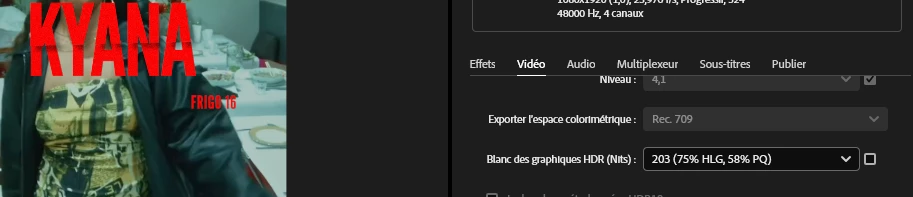
When I see something turning red (often means that an expression is breaking...) in an After Effects Mogrt I am always a bit suspicious that this might be a universalization issue. Could it be that you are using the Mogrt that was created in an English Ae in a non-Englisch Media Encoder/Premiere Pro? Looking at the screenshot...looks like you are 🙂

8 commentaires

NerawAuteur
Participant
January 10, 2025

Thanks mate, changing the language made it work! Thanks all of you for taking the time to answer my problem!
Great community there, you guys rock

Adobe Employee
January 10, 2025

Fantastic! Just for context: expressions can we written so they work with every app language. Unfortunetaly, if you buy templates online from other sources from Adobe Stock the creators of those templates often don't have international customers in mind and don't think to set them up the correct way. If you get your templates from Adobe Stock this would never happen. Have an awesome day!

NerawAuteur
Participant
January 10, 2025

Just tried this "shift tricks" I did not knew about. 
But still it's not working

Adobe Employee
January 9, 2025

When I see something turning red (often means that an expression is breaking...) in an After Effects Mogrt I am always a bit suspicious that this might be a universalization issue. Could it be that you are using the Mogrt that was created in an English Ae in a non-Englisch Media Encoder/Premiere Pro? Looking at the screenshot...looks like you are 🙂

jamieclarke
Community Manager
Community Manager
January 9, 2025

Hi @Neraw - Can you share this graphic template with us?  

Can you try and hold down "SHIFT" while launching Premiere and check the boxes

"Reset App Preferences"

"Reset Plugin Cache"
"Clear media cache files"

NerawAuteur
Participant
January 9, 2025

yes same issue with proRes

jamieclarke
Community Manager
Community Manager
January 8, 2025

Hi @Neraw - Does this issue occur only when exporting as H.264, or do you also encounter it with ProRes?

NerawAuteur
Participant
January 8, 2025

Thanks so much for your answer
here is some more informations

Community Manager
January 8, 2025

Hi Neraw,

Welcome to the community. We can get this checked. Could you share a detailed screenshot of Export Settings and the Color Management tab of Sequence Settings? Also, please share a screenshot showing the text's appearance in the timeline. We're here to help, just need more info.


Thanks,

Sumeet